Gang Scheduling and Topology-Aware Scheduling in Upstream Kubernetes
In my Kueue post, Kueue did all the placement work. It kept the pods of a job in one RDMA local block or network block. It started a job only when all of its pods fit. The default scheduler only bound each pod to the node that Kueue picked.
This is changing. In v1.35, kube-scheduler got an alpha feature that schedules a group of pods as one unit. In v1.36, another alpha feature started to keep a group in one topology domain. The work comes from the Workload-Aware Scheduling working group of SIG Scheduling.
In this post, I go through the KEPs and where each one stands. Then I test what v1.37.1 can do. I use the same topology and mostly the same experiments as in the Kueue post.
The KEPs#
These are the KEPs that matter for multi-node jobs. The stages come from each kep.yaml and from the feature gates in kube_features.go at the release tags.
| KEP | What it adds | v1.35 | v1.36 | v1.37 | v1.38 target |
|---|---|---|---|---|---|
| 4671 Gang scheduling | The Workload and PodGroup APIs, and all-or-nothing scheduling with minCount | Alpha | Alpha | Beta, off by default | Beta, GA planned for v1.39 |
| 5732 Topology-aware workload scheduling | One topology domain for all pods of a PodGroup | Alpha | Alpha | Beta | |
| 5710 Workload-aware preemption | PodGroup priority, and preemption of whole groups | Alpha | Beta, off by default | Beta, GA planned for v1.39 | |
| 6012 CompositePodGroup | Groups of groups, with a topology at each level | Alpha | Beta | ||
| 5547 Workload API in Job | spec.scheduling in a Job, and a Job controller that creates the Workload and PodGroup | Alpha | Alpha | Beta | |
| 6089 Controller building blocks | Shared types and a library for JobSet, LeaderWorkerSet and other controllers | Alpha | Beta | ||
| 5729 ResourceClaims for PodGroups | One DRA claim for a whole PodGroup | Alpha | Beta, off by default | None |
The v1.38 column is a target, not a result. v1.38 has its code freeze on 17 November 2026 and is due on 16 December 2026 (schedule).
Two rows differ from the KEP files. On 20 October 2026, an update on SIG Scheduling’s v1.38 plans was posted in #wg-workload-aware-scheduling on the Kubernetes Slack. Gang scheduling and preemption stay beta in v1.38, and GA is now planned for v1.39. The main reason is how preemption picks its victims (kubernetes/kubernetes#142718). It can evict workloads even when free capacity exists. Among the lower-priority groups, it can also pick larger, higher-priority ones when smaller ones would do. The fix changes how nodes are scored during preemption, so it needs time in beta. The thread also says the APIs stay in scheduling.k8s.io/v1beta1 in v1.38, with no v1beta2. At the time of writing, the kep.yaml files and the v1.38 tracking still say stable.
The topology beta is already merged on master (kubernetes/kubernetes#140295).
In v1.37, GenericWorkload covers both gang scheduling and preemption. KEP-5710 has a second gate, PodGroupPreemptionPolicy, which is alpha and covers the preemptionPolicy field. KEP-5547 and KEP-6089 share WorkloadWithJob. All of these gates are off by default.
The API has three objects:
- A Workload is a template. It describes the groups of a workload and their rules.
- A PodGroup is what the scheduler works with. It has a scheduling policy (
basicorgang), an optional topology constraint, a disruption mode and a priority. - A CompositePodGroup is a group of PodGroups or of other CompositePodGroups.
A pod joins a PodGroup with spec.schedulingGroup.podGroupName. In v1.37, Workload and PodGroup are scheduling.k8s.io/v1beta1, and CompositePodGroup is v1alpha3.
The test cluster#
The upstream features need feature gates on the API server, the scheduler and the controller manager, so I used kind. I ran it on an Ubuntu 24.04 VM with 8 vCPUs and 32 GB.
- kind v0.33.0, with a node image for Kubernetes v1.37.1 built by
kind build node-image v1.37.1 --image kindest/node:v1.37.1 - Docker 29.9.2
- kubectl v1.37.1
- 1 control plane node and 8 workers
v1.37.1 changes nothing in these features compared with v1.37.0 (compare).
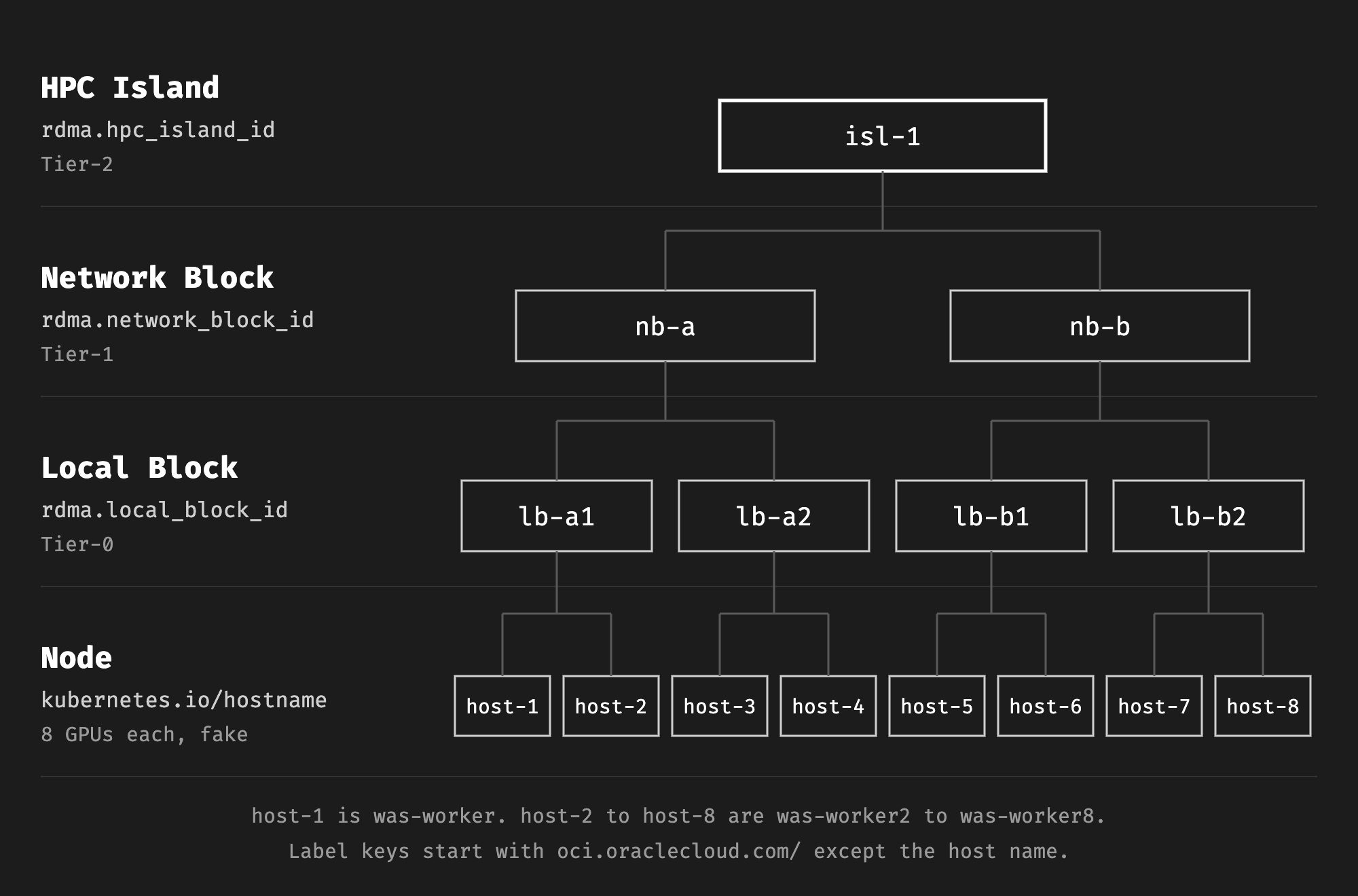
The kind config turns on the gates. Beta and alpha APIs are off by default, so it also turns on scheduling.k8s.io/v1beta1 and v1alpha3. The workers get the same topology labels as the nodes in the Kueue post. There is 1 HPC island with 2 network blocks of 2 local blocks each:
kind-was.yaml
# A kind cluster with the workload-aware scheduling features of Kubernetes v1.37 turned on.
# The 8 workers get the same RDMA topology labels as the nodes in my Kueue post.
kind: Cluster
apiVersion: kind.x-k8s.io/v1alpha4
name: was
featureGates:
  GenericWorkload: true
  TopologyAwareWorkloadScheduling: true
  CompositePodGroup: true
  WorkloadWithJob: true
  PodGroupPreemptionPolicy: true
runtimeConfig:
  scheduling.k8s.io/v1beta1: "true"
  scheduling.k8s.io/v1alpha3: "true"
nodes:
- role: control-plane
  image: kindest/node:v1.37.1
- role: worker
  image: kindest/node:v1.37.1
  labels:
    oci.oraclecloud.com/rdma.hpc_island_id: isl-1
    oci.oraclecloud.com/rdma.network_block_id: nb-a
    oci.oraclecloud.com/rdma.local_block_id: lb-a1
- role: worker
  image: kindest/node:v1.37.1
  labels:
    oci.oraclecloud.com/rdma.hpc_island_id: isl-1
    oci.oraclecloud.com/rdma.network_block_id: nb-a
    oci.oraclecloud.com/rdma.local_block_id: lb-a1
- role: worker
  image: kindest/node:v1.37.1
  labels:
    oci.oraclecloud.com/rdma.hpc_island_id: isl-1
    oci.oraclecloud.com/rdma.network_block_id: nb-a
    oci.oraclecloud.com/rdma.local_block_id: lb-a2
- role: worker
  image: kindest/node:v1.37.1
  labels:
    oci.oraclecloud.com/rdma.hpc_island_id: isl-1
    oci.oraclecloud.com/rdma.network_block_id: nb-a
    oci.oraclecloud.com/rdma.local_block_id: lb-a2
- role: worker
  image: kindest/node:v1.37.1
  labels:
    oci.oraclecloud.com/rdma.hpc_island_id: isl-1
    oci.oraclecloud.com/rdma.network_block_id: nb-b
    oci.oraclecloud.com/rdma.local_block_id: lb-b1
- role: worker
  image: kindest/node:v1.37.1
  labels:
    oci.oraclecloud.com/rdma.hpc_island_id: isl-1
    oci.oraclecloud.com/rdma.network_block_id: nb-b
    oci.oraclecloud.com/rdma.local_block_id: lb-b1
- role: worker
  image: kindest/node:v1.37.1
  labels:
    oci.oraclecloud.com/rdma.hpc_island_id: isl-1
    oci.oraclecloud.com/rdma.network_block_id: nb-b
    oci.oraclecloud.com/rdma.local_block_id: lb-b2
- role: worker
  image: kindest/node:v1.37.1
  labels:
    oci.oraclecloud.com/rdma.hpc_island_id: isl-1
    oci.oraclecloud.com/rdma.network_block_id: nb-b
    oci.oraclecloud.com/rdma.local_block_id: lb-b2
kind create cluster --config kind-was.yaml
kind nodes have no GPUs, so I gave each worker 8 GPUs as an extended resource in the node status. The scheduler only looks at node labels and resources for these decisions. So fake GPUs and hand-set labels are enough to test placement.
add-gpus.sh
#!/usr/bin/env bash
# Advertise 8 GPUs on each worker as an extended resource. The nodes have no real GPUs.
set -euo pipefail

for node in $(kubectl get nodes -l '!node-role.kubernetes.io/control-plane' -o name); do
  kubectl patch "$node" --subresource=status --type=json \
    -p '[{"op":"add","path":"/status/capacity/nvidia.com~1gpu","value":"8"}]'
done
./add-gpus.sh
These are the workers after the script:
NAME                GPU      NB       LB
was-control-plane   <none>   <none>   <none>
was-worker          8        nb-a     lb-a1
was-worker2         8        nb-a     lb-a1
was-worker3         8        nb-a     lb-a2
was-worker4         8        nb-a     lb-a2
was-worker5         8        nb-b     lb-b1
was-worker6         8        nb-b     lb-b1
was-worker7         8        nb-b     lb-b2
was-worker8         8        nb-b     lb-b2
Two small scripts help below. fill.sh keeps nodes busy with a pod that takes all 8 GPUs. where.sh prints each pod with the network block and local block of its node:
fill.sh
#!/usr/bin/env bash
# Keep each given node busy with one pod that takes all 8 GPUs.
set -euo pipefail

for node in "$@"; do
  kubectl apply -f - <<EOF
apiVersion: v1
kind: Pod
metadata:
  name: filler-${node}
  labels:
    app: filler
spec:
  nodeSelector:
    kubernetes.io/hostname: ${node}
  containers:
  - name: filler
    image: registry.k8s.io/pause:3.10
    resources:
      limits:
        nvidia.com/gpu: 8
EOF
done
where.sh
#!/usr/bin/env bash
# Print each pod with its node, and the network block and local block of that node.
# Usage: ./where.sh [label selector]
set -euo pipefail

args=()
if [[ -n "${1:-}" ]]; then
  args=(-l "$1")
fi

{
  printf 'POD\tPHASE\tNODE\tNB\tLB\n'
  kubectl get pods ${args[@]+"${args[@]}"} -o json |
    jq -r --slurpfile nodes <(kubectl get nodes -o json) '
      ($nodes[0].items | map({(.metadata.name): .metadata.labels}) | add) as $labels
      | .items[]
      | (.spec.nodeName // "") as $node
      | [.metadata.name, .status.phase, (if $node == "" then "-" else $node end),
         ($labels[$node]["oci.oraclecloud.com/rdma.network_block_id"] // "-"),
         ($labels[$node]["oci.oraclecloud.com/rdma.local_block_id"] // "-")]
      | @tsv'
} | column -t
Every test pod asks for 8 GPUs. So each pod takes a whole node, like a training worker on a GPU node.
Gang scheduling#
Without a gang#
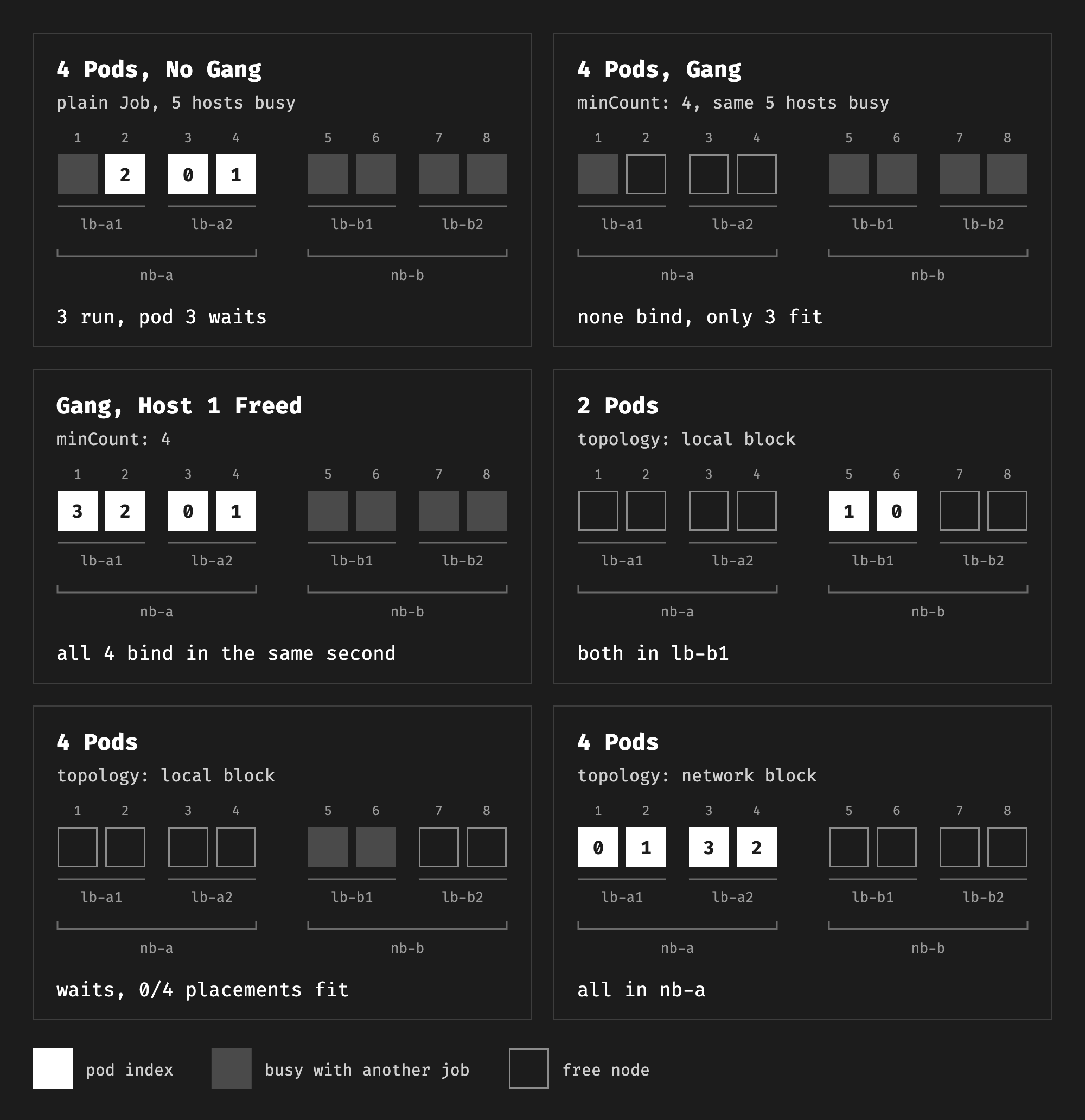
I kept five nodes busy, so only three were free. Then I created a Job with 4 pods and no scheduling settings:
plain-4.yaml
apiVersion: batch/v1
kind: Job
metadata:
  name: plain-4
spec:
  completionMode: Indexed
  completions: 4
  parallelism: 4
  template:
    spec:
      restartPolicy: Never
      containers:
      - name: worker
        image: registry.k8s.io/pause:3.10
        resources:
          limits:
            nvidia.com/gpu: 8
./fill.sh was-worker was-worker5 was-worker6 was-worker7 was-worker8
kubectl apply -f plain-4.yaml
./where.sh job-name=plain-4
POD              PHASE    NODE         NB    LB
plain-4-0-fn6hl  Running  was-worker3  nb-a  lb-a2
plain-4-1-swqgb  Running  was-worker4  nb-a  lb-a2
plain-4-2-jgbhz  Running  was-worker2  nb-a  lb-a1
plain-4-3-2kv5d  Pending  -            -     -
Three pods started and one waited. The scheduler reported 0/9 nodes are available: 1 node(s) had untolerated taint(s), 8 Insufficient nvidia.com/gpu. This is the default behavior. A training job in this state holds three nodes and does nothing.
With WorkloadWithJob on, the Job controller still made a Workload and a Basic PodGroup for this Job. Every pod pointed to the PodGroup:
NAME                                            AGE
workload.scheduling.k8s.io/plain-4-7886c57758   25s

NAME                                                                     POLICY   WORKLOAD             STATUS      AGE
podgroup.scheduling.k8s.io/plain-4-7886c57758-plain-4-pgt-0-787998f779   Basic    plain-4-7886c57758   Scheduled   25s
plain-4-0-fn6hl schedulingGroup={"podGroupName":"plain-4-7886c57758-plain-4-pgt-0-787998f779"}
With a gang#
The same Job with a gang policy only adds spec.scheduling (the field is alpha and needs WorkloadWithJob):
  scheduling:
    schedulingPolicy:
      gang:
        minCount: 4
gang-4.yaml
apiVersion: batch/v1
kind: Job
metadata:
  name: gang-4
spec:
  completionMode: Indexed
  completions: 4
  parallelism: 4
  scheduling:
    schedulingPolicy:
      gang:
        minCount: 4
  template:
    spec:
      restartPolicy: Never
      containers:
      - name: worker
        image: registry.k8s.io/pause:3.10
        resources:
          limits:
            nvidia.com/gpu: 8
With the same three free nodes, no pod started:
POD             PHASE    NODE  NB  LB
gang-4-0-ktxsr  Pending  -     -   -
gang-4-1-6n5bf  Pending  -     -   -
gang-4-2-9bq5q  Pending  -     -   -
gang-4-3-v4ct9  Pending  -     -   -
The PodGroup says why:
NAME                                       POLICY   WORKLOAD           STATUS          AGE
gang-4-f8d7bc7f5-gang-4-pgt-0-57cb7c9c59   Gang     gang-4-f8d7bc7f5   Unschedulable   20s
{"name":"gang-4-f8d7bc7f5-gang-4-pgt-0-57cb7c9c59","policy":{"gang":{"minCount":4}},"conditions":[{"type":"PodGroupInitiallyScheduled","status":"False","reason":"Unschedulable","message":"pod group is unschedulable, 0/1 placements are available, first placement status: minCount (4) cannot be satisfied: 3 scheduled, 0 remaining, pod group preemption: No preemption victims found for incoming preemptor"}]}
Three pods fit, but minCount is 4, so the scheduler bound none. Then I freed a fourth node:
kubectl delete pod filler-was-worker
POD             PHASE    NODE         NB    LB
gang-4-0-ktxsr  Running  was-worker3  nb-a  lb-a2
gang-4-1-6n5bf  Running  was-worker4  nb-a  lb-a2
gang-4-2-9bq5q  Running  was-worker2  nb-a  lb-a1
gang-4-3-v4ct9  Running  was-worker   nb-a  lb-a1
All four pods got their PodScheduled condition in the same second, 2026-10-26T16:21:31Z. The scheduler places the whole group in one cycle and binds it only if at least minCount pods fit.
The PodGroup that the Job controller created has the gang policy and a few defaults, trimmed:
  "spec": {
    "disruptionMode": {
      "single": {}
    },
    "preemptionPolicy": "PreemptLowerPriority",
    "priority": 0,
    "schedulingPolicy": {
      "gang": {
        "minCount": 4
      }
    },
    "workloadRef": {
      "templateName": "gang-4-pgt-0",
      "workloadName": "gang-4-f8d7bc7f5"
    }
  },
This is what Kueue gave me before with all-or-nothing admission. The difference is where it happens. Kueue decides before the pods exist. The scheduler decides with the pods in its queue.
Topology#
A topology constraint goes into the same spec.scheduling field. It names a node label (TopologyConstraint). All pods of the PodGroup must land on nodes with the same value of that label. In v1.37, a PodGroup can have only one constraint.
local-2.yaml
apiVersion: batch/v1
kind: Job
metadata:
  name: local-2
spec:
  completionMode: Indexed
  completions: 2
  parallelism: 2
  scheduling:
    schedulingPolicy:
      gang:
        minCount: 2
    schedulingConstraints:
      topology:
      - key: oci.oraclecloud.com/rdma.local_block_id
  template:
    spec:
      restartPolicy: Never
      containers:
      - name: worker
        image: registry.k8s.io/pause:3.10
        resources:
          limits:
nvidia.com/gpu: 8local-4.yaml, block-4.yaml and block-3.yaml are the same Job. Only the name, the pod count, minCount and, for the block jobs, the label key change.
Two pods in one local block#
On an empty cluster, both pods went to one local block:
POD              PHASE    NODE         NB    LB
local-2-0-cddt8  Running  was-worker6  nb-b  lb-b1
local-2-1-t9xtk  Running  was-worker5  nb-b  lb-b1
Four pods in one local block#
No local block has four nodes, so local-4 waited:
PodGroupInitiallyScheduled=False reason=Unschedulable message=pod group is unschedulable, 0/4 placements are available, first placement status: minCount (4) cannot be satisfied: 2 scheduled, 1 remaining, pod group preemption: No preemption victims found for incoming preemptor
The scheduler made one placement for each of the four local blocks, and none fit. This is the same result as Kueue’s podset-required-topology in the Kueue post. Kueue’s podset-preferred-topology would have moved up to the network block instead. Upstream has no preferred mode yet. KEP-5732 lists placements with fallbacks, and preferred constraints, as future KEPs.
Four pods in one network block#
With the network block as the key, the four pods went to the four nodes of nb-a:
POD              PHASE    NODE         NB    LB
block-4-0-g24cd  Running  was-worker   nb-a  lb-a1
block-4-1-r64gx  Running  was-worker2  nb-a  lb-a1
block-4-2-79flh  Running  was-worker4  nb-a  lb-a2
block-4-3-vvrcc  Running  was-worker3  nb-a  lb-a2
Best fit#
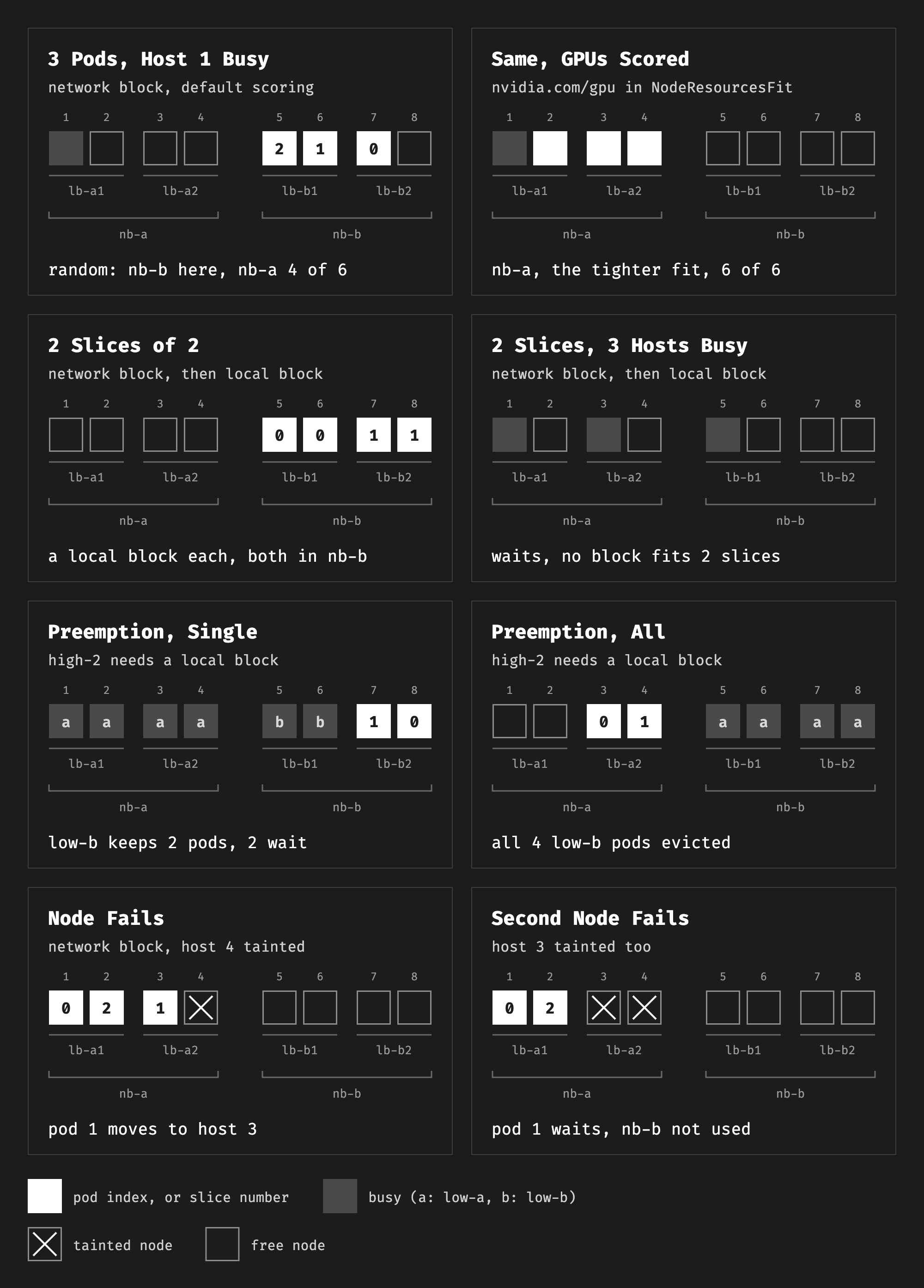
In the Kueue post, Kueue picked the domain with the least room left. That kept a whole block free for a larger job. I ran the same test. I kept one node busy, so one network block had three free nodes and the other had four. Then I created block-3, three pods with the network block as the key.
With the busy node in lb-b1, the pods went to nb-b, the tighter block. With the busy node in lb-a1, they went to nb-b too, the emptier block. I ran the second case six more times:
run 1:  3 nb-b
run 2:  3 nb-a
run 3:  3 nb-a
run 4:  3 nb-a
run 5:  3 nb-b
run 6:  3 nb-a
The choice was random. The reason is in the scoring.
- The scorer. Each feasible placement gets a score from the placement score plugins. One of them is
NodeResourcesFit, which scores a placement with theMostAllocatedstrategy (fit.go,resource_allocation.go). That favors the fullest placement, which is best fit. - The resources. The scorer only counts the resources in the plugin’s scoring strategy. By default, those are CPU and memory (
defaults.go). My pods only request GPUs. Still, the scorer counts each one as 100m CPU and 200 MiB of memory, the default for no requests (resource_allocation.go). - The tie. The busy node made one block fuller by only 100m CPU and 200 MiB. On these nodes, that was too small to change the integer score, so both blocks got the same score. The scheduler breaks ties at random (
schedule_one_podgroup.go).
So I added nvidia.com/gpu to the scoring resources:
scheduler-config.yaml
# Add GPUs to the resources that NodeResourcesFit scores. The default is CPU and memory only.
apiVersion: kubescheduler.config.k8s.io/v1
kind: KubeSchedulerConfiguration
clientConnection:
  kubeconfig: /etc/kubernetes/scheduler.conf
profiles:
- schedulerName: default-scheduler
  pluginConfig:
  - name: NodeResourcesFit
    args:
      scoringStrategy:
        type: LeastAllocated
        resources:
        - name: cpu
          weight: 1
        - name: memory
          weight: 1
        - name: nvidia.com/gpu
          weight: 1
kind runs kube-scheduler as a static pod. This script copies the config to the control plane node and adds a --config flag to the pod:
use-scheduler-config.sh
#!/usr/bin/env bash
# Restart kube-scheduler on the kind control plane with scheduler-config.yaml.
set -euo pipefail

node=was-control-plane
manifest=/etc/kubernetes/manifests/kube-scheduler.yaml

docker cp scheduler-config.yaml "$node:/etc/kubernetes/scheduler-config.yaml"
docker cp "$node:$manifest" kube-scheduler.yaml.orig

# Add the --config flag, a volume mount and a volume for the config file.
sed -e 's|^    - --leader-elect=true$|&\n    - --config=/etc/kubernetes/scheduler-config.yaml|' \
    -e 's|^      readOnly: true$|&\n    - mountPath: /etc/kubernetes/scheduler-config.yaml\n      name: scheduler-config\n      readOnly: true|' \
    -e 's|^status: {}$|  - hostPath:\n      path: /etc/kubernetes/scheduler-config.yaml\n      type: File\n    name: scheduler-config\n&|' \
    kube-scheduler.yaml.orig > kube-scheduler.yaml

docker cp kube-scheduler.yaml "$node:$manifest"
After that, the choice was the same every time, six runs in each case:
=== busy node in lb-a1 (nb-a has 3 free, nb-b has 4)
run 1:  3 nb-a
run 2:  3 nb-a
run 3:  3 nb-a
run 4:  3 nb-a
run 5:  3 nb-a
run 6:  3 nb-a
=== busy node in lb-b1 (nb-a has 4 free, nb-b has 3)
run 1:  3 nb-b
run 2:  3 nb-b
run 3:  3 nb-b
run 4:  3 nb-b
run 5:  3 nb-b
run 6:  3 nb-b
This config also changes node scoring, but only for pods that request GPUs. The scorer skips a resource that a pod does not request (resource_allocation.go). The node strategy is still LeastAllocated, so a GPU pod now prefers the node with the most free GPUs. That spreads smaller GPU pods across nodes. I kept this config for the rest of the tests.
Slices#
Kueue’s slices split a job into groups of pods, and keep each group in one domain. Upstream, a slice is a PodGroup with its own constraint, and a CompositePodGroup holds the slices together. The Job API in v1.37 has no field for this, so I created the objects myself. A controller such as JobSet would create them in practice.
slices.yaml
# Two slices of two pods. Each slice must fit in one local block,
# and both slices must fit in one network block.
apiVersion: scheduling.k8s.io/v1beta1
kind: Workload
metadata:
  name: slices
spec:
  compositePodGroupTemplates:
  - name: job
    schedulingPolicy:
      gang:
        minGroupCount: 2
    schedulingConstraints:
      topology:
      - key: oci.oraclecloud.com/rdma.network_block_id
    podGroupTemplates:
    - name: slice
      schedulingPolicy:
        gang:
          minCount: 2
      schedulingConstraints:
        topology:
        - key: oci.oraclecloud.com/rdma.local_block_id
---
apiVersion: scheduling.k8s.io/v1alpha3
kind: CompositePodGroup
metadata:
  name: slices
spec:
  workloadRef:
    workloadName: slices
    templateName: job
  schedulingPolicy:
    gang:
      minGroupCount: 2
  schedulingConstraints:
    topology:
    - key: oci.oraclecloud.com/rdma.network_block_id
---
apiVersion: scheduling.k8s.io/v1beta1
kind: PodGroup
metadata:
  name: slices-0
spec:
  parentCompositePodGroupName: slices
  workloadRef:
    workloadName: slices
    templateName: slice
  schedulingPolicy:
    gang:
      minCount: 2
  schedulingConstraints:
    topology:
    - key: oci.oraclecloud.com/rdma.local_block_id
---
apiVersion: scheduling.k8s.io/v1beta1
kind: PodGroup
metadata:
  name: slices-1
spec:
  parentCompositePodGroupName: slices
  workloadRef:
    workloadName: slices
    templateName: slice
  schedulingPolicy:
    gang:
      minCount: 2
  schedulingConstraints:
    topology:
    - key: oci.oraclecloud.com/rdma.local_block_id
slices-pods.sh
#!/usr/bin/env bash
# Create two pods in each of the PodGroups slices-0 and slices-1.
set -euo pipefail

for group in slices-0 slices-1; do
  for i in 0 1; do
    kubectl apply -f - <<EOF
apiVersion: v1
kind: Pod
metadata:
  name: ${group}-${i}
  labels:
    app: slices
spec:
  schedulingGroup:
    podGroupName: ${group}
  containers:
  - name: worker
    image: registry.k8s.io/pause:3.10
    resources:
      limits:
        nvidia.com/gpu: 8
EOF
  done
done
The CompositePodGroup is a gang of two slices in one network block. Each slice is a gang of two pods in one local block. On an empty cluster:
POD         PHASE    NODE         NB    LB
slices-0-0  Running  was-worker6  nb-b  lb-b1
slices-0-1  Running  was-worker5  nb-b  lb-b1
slices-1-0  Running  was-worker8  nb-b  lb-b2
slices-1-1  Running  was-worker7  nb-b  lb-b2
Each slice got its own local block, and both slices stayed in nb-b. This is what Kueue’s multi-layer slices do.
Then I repeated the busy case from the Kueue post. I kept one node busy in each of lb-a1, lb-a2 and lb-b1. Only lb-b2 had room for a whole slice:
POD                 PHASE    NODE         NB    LB
filler-was-worker   Running  was-worker   nb-a  lb-a1
filler-was-worker3  Running  was-worker3  nb-a  lb-a2
filler-was-worker5  Running  was-worker5  nb-b  lb-b1
slices-0-0          Pending  -            -     -
slices-0-1          Pending  -            -     -
slices-1-0          Pending  -            -     -
slices-1-1          Pending  -            -     -
PodGroup/slices-0: PodGroupInitiallyScheduled=False reason=Unschedulable message=pod group is unschedulable, 0/2 placements are available, first placement status: minCount (2) cannot be satisfied: 1 scheduled, 0 remaining, pod group preemption: No preemption victims found for incoming preemptor
The whole job waited, as it did with Kueue. The message of slices-0 comes from inside nb-a. Its two placements are the two local blocks of nb-a. Each had one free node, so only one pod of the slice fit. The CompositePodGroup itself had no condition, so the reason is only on the PodGroups.
Preemption#
KEP-5710 gives each PodGroup a priority and a disruption mode. With single, the scheduler can preempt some pods of a group. With all, it preempts the whole group.
I made two priority classes. Then I filled the cluster with two low-priority jobs of four pods, one in each network block. Then a high-priority job with two pods in one local block had to preempt something.
priorities.yaml
apiVersion: scheduling.k8s.io/v1
kind: PriorityClass
metadata:
  name: low
value: 100
---
apiVersion: scheduling.k8s.io/v1
kind: PriorityClass
metadata:
  name: high
value: 1000
low-single.yaml
apiVersion: batch/v1
kind: Job
metadata:
  name: low-a
spec:
  completionMode: Indexed
  completions: 4
  parallelism: 4
  scheduling:
    schedulingPolicy:
      gang:
        minCount: 4
    schedulingConstraints:
      topology:
      - key: oci.oraclecloud.com/rdma.network_block_id
    disruptionMode:
      single: {}
  template:
    spec:
      priorityClassName: low
      restartPolicy: Never
      containers:
      - name: worker
        image: busybox:1.37
        command: ["sh", "-c", "trap 'exit 1' TERM; while true; do sleep 1; done"]
        resources:
          limits:
            nvidia.com/gpu: 8
---
apiVersion: batch/v1
kind: Job
metadata:
  name: low-b
spec:
  completionMode: Indexed
  completions: 4
  parallelism: 4
  scheduling:
    schedulingPolicy:
      gang:
        minCount: 4
    schedulingConstraints:
      topology:
      - key: oci.oraclecloud.com/rdma.network_block_id
    disruptionMode:
      single: {}
  template:
    spec:
      priorityClassName: low
      restartPolicy: Never
      containers:
      - name: worker
        image: busybox:1.37
        command: ["sh", "-c", "trap 'exit 1' TERM; while true; do sleep 1; done"]
        resources:
          limits:
            nvidia.com/gpu: 8
low-all.yaml is the same with all: {} instead of single: {}.
high-2.yaml
apiVersion: batch/v1
kind: Job
metadata:
  name: high-2
spec:
  completionMode: Indexed
  completions: 2
  parallelism: 2
  scheduling:
    schedulingPolicy:
      gang:
        minCount: 2
    schedulingConstraints:
      topology:
      - key: oci.oraclecloud.com/rdma.local_block_id
  template:
    spec:
      priorityClassName: high
      restartPolicy: Never
      containers:
      - name: worker
        image: registry.k8s.io/pause:3.10
        resources:
          limits:
            nvidia.com/gpu: 8
The workers run a shell loop that exits with 1 on SIGTERM. My first run used pause, which exits with 0. The Job then counted the preempted pods as succeeded ("completedIndexes":"2,3"), the same problem as in the Kueue post.
Single#
With single, the scheduler preempted two pods of low-b, the two in lb-b2:
POD             PHASE    NODE         NB    LB
high-2-0-sm5t7  Running  was-worker8  nb-b  lb-b2
high-2-1-c6kpt  Running  was-worker7  nb-b  lb-b2
low-a-0-spz8p   Running  was-worker   nb-a  lb-a1
low-a-1-z8vkq   Running  was-worker3  nb-a  lb-a2
low-a-2-tcf9j   Running  was-worker4  nb-a  lb-a2
low-a-3-rl2v4   Running  was-worker2  nb-a  lb-a1
low-b-0-cljk2   Running  was-worker6  nb-b  lb-b1
low-b-1-x9kr8   Running  was-worker5  nb-b  lb-b1
low-b-2-jdtqz   Pending  -            -     -
low-b-3-7v6p5   Pending  -            -     -
The Job replaced the two pods, but they could not run:
low-b-3-7v6p5 pod group is unschedulable, 0/1 placements are available, first placement status: minCount (4) cannot be satisfied: 2 scheduled, 1 remaining
So low-b kept two pods running and two waiting. For a training job, that is the worst case. It holds two nodes and does no work.
All#
With all, the scheduler took lb-a2 this time, and preempted all four pods of low-b:
POD             PHASE    NODE         NB    LB
high-2-0-p5rh2  Running  was-worker3  nb-a  lb-a2
high-2-1-68x4v  Running  was-worker4  nb-a  lb-a2
low-a-0-28sqb   Running  was-worker6  nb-b  lb-b1
low-a-1-x9w95   Running  was-worker8  nb-b  lb-b2
low-a-2-q6kt2   Running  was-worker5  nb-b  lb-b1
low-a-3-sdp6g   Running  was-worker7  nb-b  lb-b2
2026-10-26T16:38:31.900454Z Pod/low-b-1-hbjr4 Preempted Preempted by podgroup fa85ad63-bb59-47d4-9892-6d9ede0e7c73 on node cluster
2026-10-26T16:38:31.902871Z Pod/low-b-0-mrkpx Preempted Preempted by podgroup fa85ad63-bb59-47d4-9892-6d9ede0e7c73 on node cluster
2026-10-26T16:38:31.906746Z Pod/low-b-2-grrpr Preempted Preempted by podgroup fa85ad63-bb59-47d4-9892-6d9ede0e7c73 on node cluster
2026-10-26T16:38:31.920763Z Pod/low-b-3-t4lf4 Preempted Preempted by podgroup fa85ad63-bb59-47d4-9892-6d9ede0e7c73 on node cluster
The Job created four new pods at 16:39:52, about 80 seconds later. The Job controller’s backoff starts at 10 seconds and doubles with each failure. All four pods failed at once, so the Job waited for the fourth step, 80 seconds. The new pods waited for a whole network block:
pod group is unschedulable, 0/2 placements are available, first placement status: minCount (4) cannot be satisfied: 2 scheduled, 1 remaining
This is close to what Kueue does. Kueue also evicts whole Workloads and puts them back in the queue. Both pick lower-priority victims. Kueue preempts when quota runs out or when the topology does not fit. The scheduler has no quota. It preempts when the group, with its topology constraint, does not fit on the free nodes. And the scheduler lets each group choose single or all.
The victim choice is still changing. The update says it can evict a group even when free capacity exists (kubernetes/kubernetes#142718). The team hopes to land a fix in v1.38, so this behavior may change.
A node fails under a running group#
In the Kueue post, Kueue replaced a failed node with a free node of the same domain. The job kept running. Upstream has no such feature. KEP-5732 has one related rule, though. When some pods of a PodGroup are already running, the scheduler only considers placements that include their nodes.
I ran three pods in one network block, so one node of that block stayed free. The workers use the same shell loop:
train-3.yaml
apiVersion: batch/v1
kind: Job
metadata:
  name: train-3
spec:
  completionMode: Indexed
  completions: 3
  parallelism: 3
  scheduling:
    schedulingPolicy:
      gang:
        minCount: 3
    schedulingConstraints:
      topology:
      - key: oci.oraclecloud.com/rdma.network_block_id
  template:
    spec:
      restartPolicy: Never
      containers:
      - name: worker
        image: busybox:1.37
        command: ["sh", "-c", "trap 'exit 1' TERM; while true; do sleep 1; done"]
        resources:
          limits:
            nvidia.com/gpu: 8
The three pods started in nb-a, and was-worker3 stayed free:
POD              PHASE    NODE         NB    LB
train-3-0-6rnhp  Running  was-worker   nb-a  lb-a1
train-3-1-kqknb  Running  was-worker4  nb-a  lb-a2
train-3-2-gdz88  Running  was-worker2  nb-a  lb-a1
Then I tainted the node of pod 1 with NoExecute:
kubectl taint node was-worker4 example.com/failed=true:NoExecute
POD              PHASE    NODE         NB    LB
train-3-0-6rnhp  Running  was-worker   nb-a  lb-a1
train-3-1-kz9ft  Running  was-worker3  nb-a  lb-a2
train-3-2-gdz88  Running  was-worker2  nb-a  lb-a1
The Job created a new pod 1 at 16:41:45, 11 seconds after the taint. The scheduler put it on was-worker3, the free node of nb-a. It did not use nb-b, which had four free nodes. Then I tainted was-worker3 too:
POD              PHASE    NODE         NB    LB
train-3-0-6rnhp  Running  was-worker   nb-a  lb-a1
train-3-1-bxtzs  Pending  -            -     -
train-3-2-gdz88  Running  was-worker2  nb-a  lb-a1
train-3-1-bxtzs: 0/4 nodes are available: 2 Insufficient nvidia.com/gpu, 2 node(s) had untolerated taint(s).
The scheduler looked at only the four nodes of nb-a. The job stayed with two pods running and one waiting, and nothing stopped it. With required placement, Kueue’s node replacement also looks for a new node only in the same domain. But when it finds none, Kueue evicts the job and puts it back in the queue. Upstream, the job stays stuck until someone acts.
I also ran this with disruptionMode: all. The failure still took down only one pod, and the scheduler replaced it in the same block. The disruption mode is for preemption only. KEP-5710 lists other disruptions, such as hardware failures, as a non-goal.
Suspend and resume#
Kueue holds every Job suspended until it admits it. So it matters what the Job controller does with the PodGroup when a Job is suspended. In v1.37.1:
- A Job created with
suspend: truealready had its Workload and PodGroup, with the statusPending. - Suspending a running Job deleted its pods but kept the PodGroup, still
Scheduled. - Resuming the Job reused the same PodGroup.
The gang still held after a resume. I suspended gang-4, left only three free nodes and resumed it. All four pods waited:
gang-4-0-mqjt9: pod group is unschedulable, pod group is unschedulable, 0/1 placements are available, first placement status: minCount (4) cannot be satisfied: 3 scheduled, 0 remaining, pod group preemption: No preemption victims found for incoming preemptor
But the PodGroup condition still said Scheduled:
{"name":"gang-4-766c5b8865-gang-4-pgt-0-6f66985859","conditions":[{"type":"PodGroupInitiallyScheduled","status":"True","reason":"Scheduled","message":""}]}
This is by design. Once PodGroupInitiallyScheduled is true, it never goes back. So after the first start, the reason a group waits is in the pod events.
The Job API and DRA#
Kueue already builds on several upstream features of Jobs and pods:
- Suspend (stable in v1.24) holds a Job until Kueue admits it.
- Mutable scheduling directives (stable in v1.27) let Kueue add a flavor’s node selector and tolerations to a new Job. KEP-5440 (beta in v1.36) allows the same for a suspended Job that already ran.
- Scheduling gates (stable in v1.30) hold the pods while Kueue’s TAS picks the nodes. KEP-3838 (stable in v1.30) then lets it narrow the node selector of a gated pod.
managedBy(stable in v1.35) lets MultiKueue run a Job on another cluster.
The upstream topology constraint needs none of the gate and node selector steps. The scheduler holds the pods until the group fits.
For DRA, the closest piece is KEP-5729. It lets a PodGroup share one ResourceClaim, which avoids the limit of 256 pods per claim. It does not change placement. These four DRA pieces for GPU and RDMA nodes work inside one node:
- The standard device attributes
pcieRoot,pciBusIDandnumaNode(attribute.go) describe where a device sits. With them, a claim can pair a GPU with a NIC on one PCIe root or NUMA node. - Consumable capacity (beta in v1.36) lets several claims share one device, for example by NIC bandwidth.
- Device status (stable in v1.37) reports the interface name, IPs and MAC of an allocated network device.
- Device taints (stable in v1.37) take a broken GPU or NIC out of scheduling.
There is no standard model for racks, blocks or spines. A driver can publish a device that spans several nodes, with the multi-host devices of KEP-4815 (beta in v1.36). KEP-5729 describes such devices as topology units. But no standard set of devices or labels exists. A proposal for standard network topology labels, KEP-4962, was closed. The topology constraint of KEP-5732 uses node labels. So you still have to set them yourself, as in the Kueue post.
What Kueue keeps#
The working group’s charter leaves out job queueing and quota. KEP-4671 keeps queues and fair sharing out of kube-scheduler too. It names Kueue and Volcano as the projects that keep that role.
Kueue’s plan is in kubernetes-sigs/kueue#8871. Kueue would hand node placement to kube-scheduler, through a scheduler library or the upstream APIs. It would keep quotas, cohorts, priorities and fair sharing. The design is still in draft KEPs. One proposed step turns on the gang policy by default for the Jobs that Kueue manages (kubernetes-sigs/kueue#13715).
Kueue features upstream#
This is how the Kueue features from my earlier post map to v1.37:
| Kueue feature | Upstream in v1.37 | Stage |
|---|---|---|
| All-or-nothing admission | Gang policy with minCount (KEP-4671) | Beta, off by default |
| Required topology | TopologyConstraint on a PodGroup (KEP-5732) | Alpha |
| Preferred topology | None. Listed as future work in KEP-5732 | None |
| Unconstrained placement | Partly. A PodGroup without a constraint has one placement over all nodes, so it does not pack pods into domains | Beta, off by default |
| Slices and multi-layer slices | PodGroups with constraints under a CompositePodGroup (KEP-6012) | Alpha |
| Best fit | NodeResourcesFit placement score, if the scored resources include GPUs | Alpha |
| Balanced placement | None | None |
| Node replacement | None. A new pod stays in the domain of the running pods | Alpha |
| PodSet groups | A CompositePodGroup with a constraint, or one PodGroup for both PodSets | Alpha. Both options need the topology constraint, which is alpha |
| Preemption of whole jobs | disruptionMode: all and PodGroup priority (KEP-5710) | Beta, off by default |
| Quota, queueing and fair sharing | None, by design | None |
What I would do#
- Keep using Kueue for multi-node GPU jobs today. The upstream features need gates on the control plane, and most of them are alpha in v1.37.
- Try them on a test cluster first. A Job with
spec.schedulingis the shortest way to get gang and topology placement. The Workload and PodGroup APIs stay inv1beta1in v1.38, and the thread calls breaking changes in v1.39 very unlikely. - Add
nvidia.com/gputo the scoring resources ofNodeResourcesFitbefore you use upstream topology on GPU nodes. Without it, the choice between domains ignores GPUs and can be random. With the defaultLeastAllocatednode strategy, this also spreads GPU pods across nodes.type: MostAllocatedpacks them instead. - Use
disruptionMode: allfor training jobs, so that preemption does not leave half a job running. A node failure can still do that. - Make workers exit with a non-zero code on
SIGTERM. Otherwise the Job counts a preempted pod as done. - After a group has started once, read the pod events, not the PodGroup condition.
- Keep labeling your nodes with the topology. Nothing upstream does that for you.
- Watch v1.38. Topology placement and CompositePodGroup are planned to go to beta. Gang scheduling and preemption stay beta, with GA planned for v1.39.