RDMA Network Locality for Multi-Node Jobs with Kueue
The pods of a multi-node training job talk to each other all the time. So where they land on the RDMA network matters. OCI’s cluster network is a three-tier Clos. OCI’s write-up of the design gives these numbers for the three tiers of switches:
- The first tier serves up to 256 GPUs, with up to 2 µs of latency.
- The second tier serves up to 2,048 GPUs, with up to 5 µs.
- The third tier serves up to 131,072 GPUs, with up to 8 µs.
The write-up calls the first tier Tier-0. The diagram below calls the other two Tier-1 and Tier-2.
In the OCI API, the groups of hosts under these tiers are a local block, a network block and an HPC island (ComputeBareMetalHost).
OCI also has a two-tier network. Oracle Acceleron’s multiplanar network is made of several independent planes, and each plane is its own Clos fabric. Each NIC connects to one switch in each plane, and most deployments have two tiers of switches instead of three. In this post I use the three-tier network, but the same logic applies to both. Pods under the same switches talk with less latency than pods whose traffic crosses more tiers. So you describe the tiers of your network as levels of a Topology, and Kueue places the pods the same way.
The default Kubernetes scheduler knows none of this. It places each pod on its own, wherever the pod fits. A 4-node job can end up with two pods in one local block and two in another network block, and nothing tells you.
Kueue’s topology-aware scheduling (TAS) fixes that. You describe the topology once. Kueue then places all the pods of a job as close together as it can. Or it keeps the job waiting until they fit where you require.
This is going to be a long post, so bear with me. I start from a cluster without Kueue, then label the nodes, install Kueue, create the four Kueue objects, and run thirteen experiments. They show how Kueue decides and what it does after a job starts. Long files are collapsed, so click a file name to open it.
The test cluster#
I tested on an OKE cluster with eight GPU nodes and three system nodes. Most pods run pause and nothing else.
- OKE v1.36.4
- kubectl v1.37.1, Helm v4.3.0 and jq 1.8.2 on my Mac
- 8 nodes in the node pool
oke-rdma - 3 system nodes in the node pool
oke-system - Kueue v0.20.2 and JobSet v0.13.0
The topology#
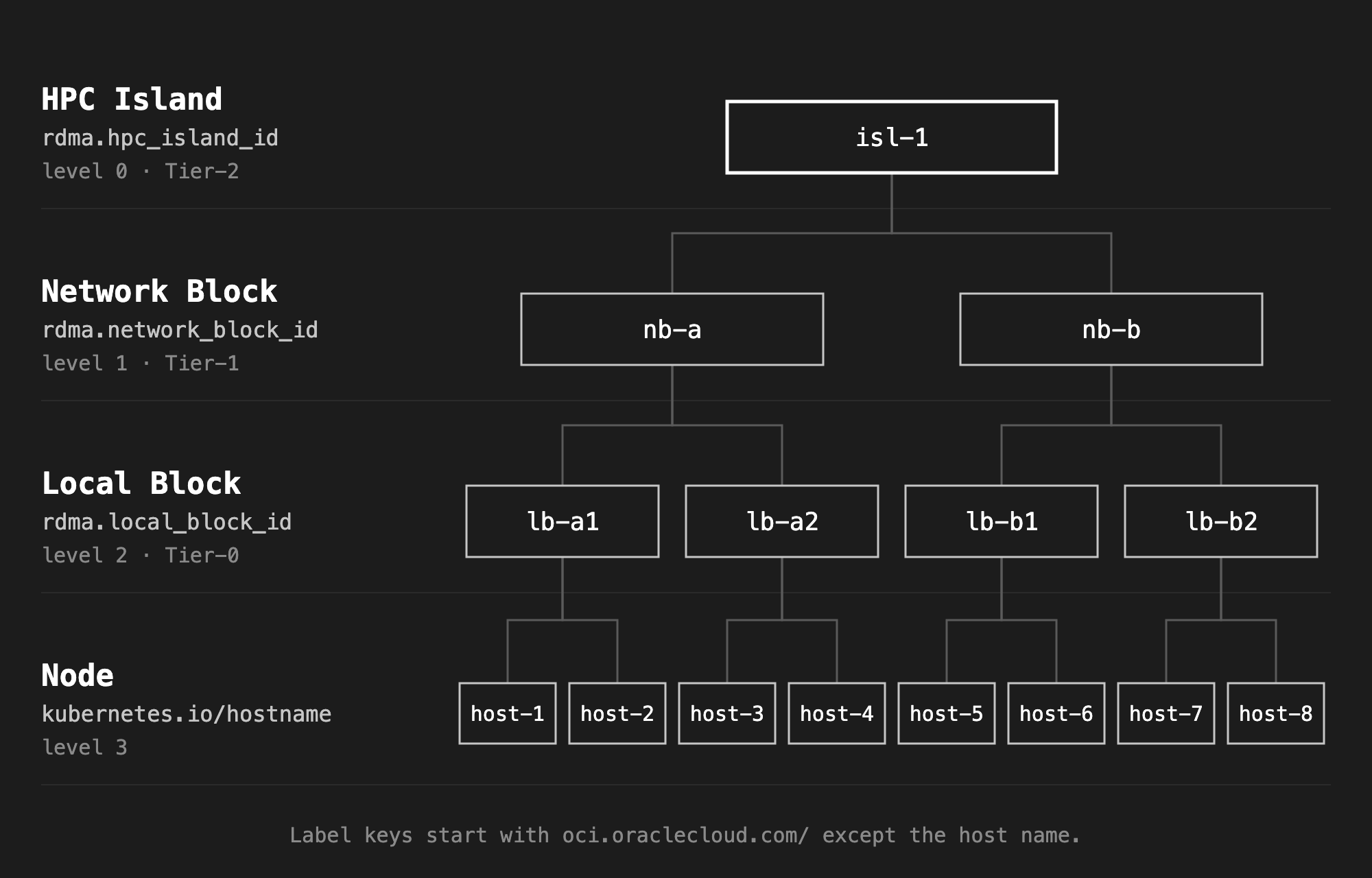
Kueue models the topology as levels, from the widest to a single node. Each level is a node label. I use oci.oraclecloud.com/rdma.hpc_island_id, oci.oraclecloud.com/rdma.network_block_id and oci.oraclecloud.com/rdma.local_block_id, with kubernetes.io/hostname at the bottom. The test cluster has one island, two network blocks, two local blocks in each, and two nodes in each local block. Real local blocks are much larger, but the shape is the same.
Where the topology comes from#
On bare metal GPU hosts, the instance metadata service (IMDS) returns the place of the host in the RDMA network at /opc/v2/host/rdmaTopologyData. This endpoint returns data only when the customer has a dedicated pool. Then the response has four OCIDs (shortened here):
{
  "customerHPCIslandId": "ocid1.hpcisland.oc1.iad.anuwcljrg5pyaeycajoqlss...",
  "customerHostId": "ocid1.computebaremetalhost.oc1.iad.anuwcljrg5pyaeycu...",
  "customerLocalBlock": "ocid1.computelocalblock.oc1.iad.anuwcljrg5pyaeyc...",
  "customerNetworkBlock": "ocid1.computenetworkblock.oc1.iad.anuwclddsdef..."
}
Kubernetes does not read IMDS, so the labels are yours to set. We have a labeler that sets them. An OCID is longer than the 63 characters that a label value allows, so use a short form of each one, such as a hash. The value only has to be the same on all hosts in one block.
For easier reading, I use short names such as isl-1, nb-a and lb-a1 instead. This script sets them:
label-topology.sh
#!/usr/bin/env bash
# Label 8 nodes with short RDMA topology names: 1 HPC island, 2 network blocks, 2 local blocks each.
# Usage: label-topology.sh <node label selector>
set -euo pipefail

selector=$1
prefix=oci.oraclecloud.com/rdma
local_blocks=(lb-a1 lb-a1 lb-a2 lb-a2 lb-b1 lb-b1 lb-b2 lb-b2)

nodes=()
while read -r node; do
  nodes+=("$node")
done < <(kubectl get nodes -l "$selector" -o jsonpath='{range .items[*]}{.metadata.name}{"\n"}{end}' | sort)
if [ "${#nodes[@]}" -ne 8 ]; then
  echo "expected 8 nodes, found ${#nodes[@]}" >&2
  exit 1
fi

for i in "${!nodes[@]}"; do
  lb=${local_blocks[$i]}
  kubectl label node "${nodes[$i]}" --overwrite \
    "$prefix.hpc_island_id=isl-1" \
    "$prefix.network_block_id=nb-${lb:3:1}" \
    "$prefix.local_block_id=$lb" \
    "$prefix.host_id=host-$((i + 1))"
done
chmod +x label-topology.sh
./label-topology.sh oke.oraclecloud.com/pool.name=oke-rdma
Labels do not survive a node replacement. A new node starts without topology labels, and Kueue leaves it out until you label it. Label the nodes again after every scale-up or node replacement.
Installing Kueue#
helm install kueue oci://registry.k8s.io/kueue/charts/kueue --version 0.20.2 \
  --namespace kueue-system --create-namespace --wait
TAS needs no extra values. The TopologyAwareScheduling feature gate is beta and on by default since Kueue 0.14 (kube_features.go). All four objects below use kueue.x-k8s.io/v1beta2. In v0.20.2, the v1beta1 versions of these APIs are deprecated and no longer served (Topology CRD). Older examples that use v1beta1 need the new version.
Topology#
topology.yaml
apiVersion: kueue.x-k8s.io/v1beta2
kind: Topology
metadata:
  name: oci-rdma
spec:
  levels:
  - nodeLabel: oci.oraclecloud.com/rdma.hpc_island_id
  - nodeLabel: oci.oraclecloud.com/rdma.network_block_id
  - nodeLabel: oci.oraclecloud.com/rdma.local_block_id
  - nodeLabel: kubernetes.io/hostname
The levels go from the widest to the narrowest, with at most 16 levels. kubernetes.io/hostname can only be the last level. With the host name as the last level, Kueue assigns every pod to a node, which shows up in the Workload status below.
ResourceFlavor#
resourceflavor.yaml
apiVersion: kueue.x-k8s.io/v1beta2
kind: ResourceFlavor
metadata:
  name: gpu-rdma
spec:
  nodeLabels:
    oke.oraclecloud.com/pool.name: oke-rdma
  topologyName: oci-rdma
  tolerations:
  - { key: nvidia.com/gpu, operator: Exists, effect: NoSchedule }
nodeLabels selects the nodes of the flavor. On a GPU cluster that would be a label such as node.kubernetes.io/instance-type: BM.GPU.H100.8. Here it is the node pool. topologyName makes it a TAS flavor. A TAS flavor needs at least one entry in nodeLabels, and its topologyName cannot be changed later. Kueue adds the nodeLabels and tolerations of the flavor to every pod that it admits on this flavor.
ClusterQueue#
clusterqueue.yaml
apiVersion: kueue.x-k8s.io/v1beta2
kind: ClusterQueue
metadata:
  name: gpu-rdma
spec:
  namespaceSelector: {}
  resourceGroups:
  - coveredResources: ["cpu", "memory", "nvidia.com/gpu"]
    flavors:
    - name: gpu-rdma
      resources:
      - { name: cpu, nominalQuota: 1000 }
      - { name: memory, nominalQuota: 8000Gi }
      - { name: nvidia.com/gpu, nominalQuota: 64 }
coveredResources must list every resource that the pods request. namespaceSelector: {} lets every namespace use the queue. Without it, no namespace can. The GPU quota is 64, 8 for each node. The ResourceFlavor, the ClusterQueue and the LocalQueue all have the name gpu-rdma.
LocalQueue#
localqueue.yaml
apiVersion: kueue.x-k8s.io/v1beta2
kind: LocalQueue
metadata:
  name: gpu-rdma
  namespace: default
spec:
  clusterQueue: gpu-rdma
kubectl apply -f topology.yaml
kubectl apply -f resourceflavor.yaml
kubectl apply -f clusterqueue.yaml
kubectl apply -f localqueue.yaml
kubectl get localqueue
NAME       CLUSTERQUEUE   PENDING WORKLOADS   ADMITTED WORKLOADS
gpu-rdma   gpu-rdma       0                   0
The ClusterQueue reports Active=True with the message Can admit new workloads.
How TAS decides#
A job asks for a topology with an annotation on its pod template:
| Annotation | What Kueue does |
|---|---|
kueue.x-k8s.io/podset-required-topology: <level> | Puts all pods in one domain of that level, or the job waits. |
kueue.x-k8s.io/podset-preferred-topology: <level> | Puts all pods in one domain of that level if they fit. If not, it moves up one level at a time. |
kueue.x-k8s.io/podset-unconstrained-topology: "true" | Uses TAS with no locality rule. |
kueue.x-k8s.io/podset-slice-required-topology: <level> and kueue.x-k8s.io/podset-slice-size: "<n>" | Splits the pods into slices of n, and puts each slice in one domain of that level. |
The annotations are defined in topology_types.go. For preferred, the step up is a call to the same search one level higher (tas_flavor_snapshot.go).
For required and preferred, Kueue uses a best-fit algorithm. Of the domains that fit, it picks the one with the least room left. For unconstrained placement, it picks the domains with the least free capacity (tas_flavor_snapshot.go).
Free capacity is the allocatable resources of each node, minus what Kueue already admitted. Kueue also subtracts the requests of pods that it did not place, such as DaemonSet pods. Kueue leaves a node out in these cases (node.go, tas_nodes_cache.go):
- The node is not Ready, or it is cordoned.
- The node does not match the
nodeLabelsof the flavor. - The node has a taint that the pods do not tolerate.
- The node is missing any of the topology labels.
The experiments#
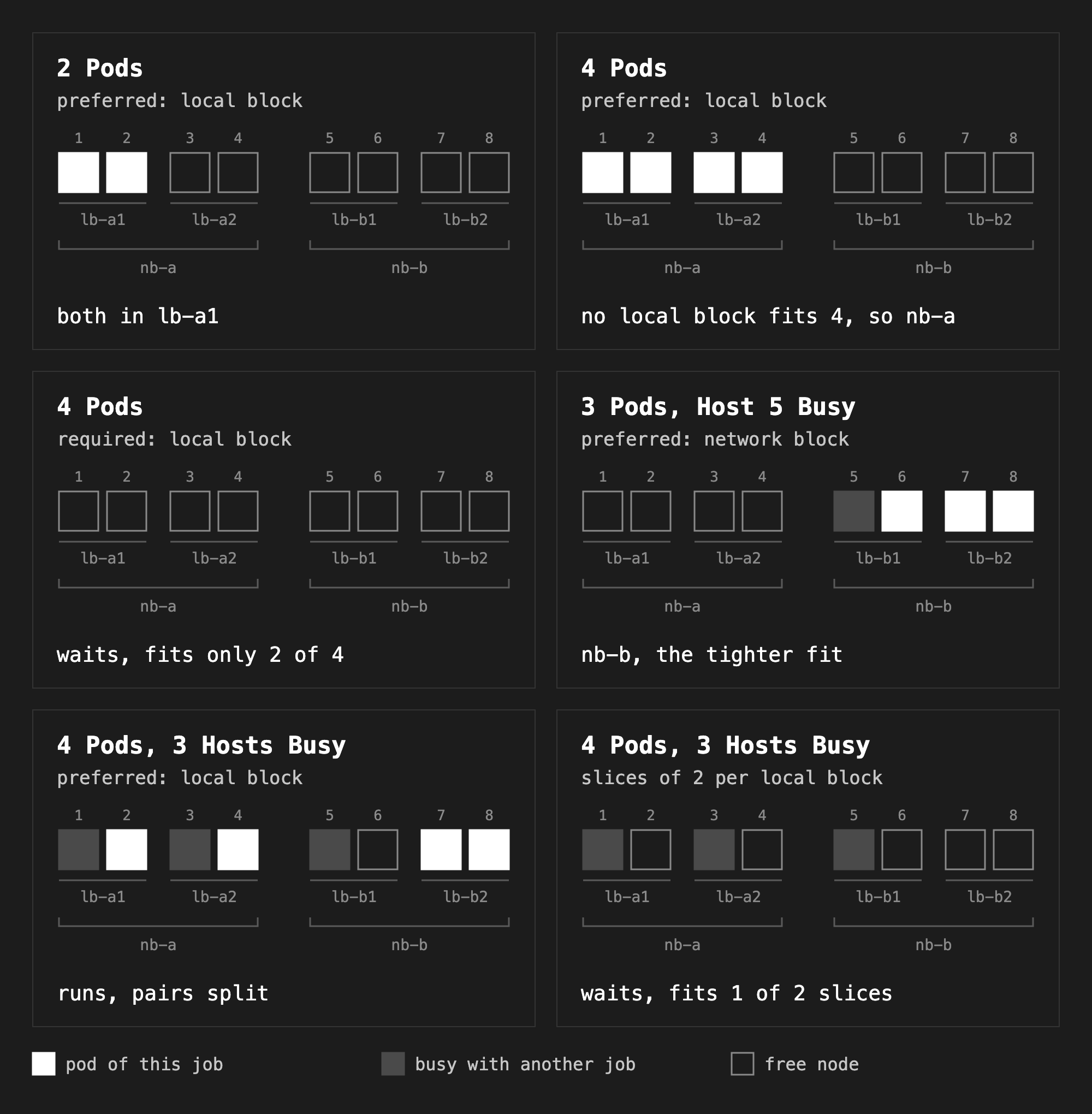
Most experiments use an Indexed Job of pause pods that each ask for 8 GPUs, so each pod takes a whole node. I ran each job with kubectl apply -f <file>. I deleted it with kubectl delete -f <file> before the next experiment, unless I say otherwise. To see where the pods landed, I used this script:
placement.sh
#!/usr/bin/env bash
# Show where the pods of a job landed in the RDMA topology.
# Usage: placement.sh <pod label selector>
set -euo pipefail

printf '%-32s %-14s %-14s %-12s\n' POD NODE NETWORK_BLOCK LOCAL_BLOCK
kubectl get pods -l "$1" -o jsonpath='{range .items[*]}{.metadata.name}{" "}{.spec.nodeName}{"\n"}{end}' | sort |
while read -r pod node; do
  if [ -z "${node:-}" ]; then
    printf '%-32s %-14s\n' "$pod" "(not scheduled)"
    continue
  fi
  labels=$(kubectl get node "$node" -o jsonpath='{.metadata.labels.oci\.oraclecloud\.com/rdma\.network_block_id} {.metadata.labels.oci\.oraclecloud\.com/rdma\.local_block_id}')
  read -r nb lb <<< "$labels"
  printf '%-32s %-14s %-14s %-12s\n' "$pod" "$node" "$nb" "$lb"
done
chmod +x placement.sh
I used these commands for Kueue’s view of a job:
kubectl get workloads

kubectl get workload <name> -o jsonpath='{.status.admission.podSetAssignments[*].topologyAssignment}' | jq

kubectl get workload <name> -o json | jq -r '.status.conditions[] | "\(.type)=\(.status) reason=\(.reason) message=\(.message)"'
Two pods, preferred local block#
local-2.yaml
apiVersion: batch/v1
kind: Job
metadata:
  name: local-2
  labels:
    kueue.x-k8s.io/queue-name: gpu-rdma
spec:
  parallelism: 2
  completions: 2
  completionMode: Indexed
  template:
    metadata:
      annotations:
        kueue.x-k8s.io/podset-preferred-topology: oci.oraclecloud.com/rdma.local_block_id
    spec:
      restartPolicy: Never
      containers:
      - name: worker
        image: registry.k8s.io/pause:3.10.2
        resources:
          requests: { cpu: 100m, memory: 64Mi }
          limits: { nvidia.com/gpu: 8 }
kubectl apply -f local-2.yaml
./placement.sh job-name=local-2
POD                              NODE           NETWORK_BLOCK  LOCAL_BLOCK
local-2-0-l4x46                  10.140.65.205  nb-a           lb-a1
local-2-1-kstl9                  10.140.68.178  nb-a           lb-a1
Both pods are in lb-a1. The Workload holds the assignment in a compact form:
{
  "levels": [
    "kubernetes.io/hostname"
  ],
  "slices": [
    {
      "domainCount": 2,
      "podCounts": {
        "universal": 1
      },
      "valuesPerLevel": [
        {
          "individual": {
            "prefix": "10.140.6",
            "roots": [
              "5.205",
              "8.178"
            ]
          }
        }
      ]
    }
  ]
}
levels has only the host name, because the Topology ends with it. The two host names share the prefix 10.140.6, so Kueue stores the prefix once and then the rest of each name, 5.205 and 8.178. podCounts.universal: 1 means one pod on each of the two nodes. The format is defined in workload_types.go.
Four pods, preferred local block#
local-4.yaml
apiVersion: batch/v1
kind: Job
metadata:
  name: local-4
  labels:
    kueue.x-k8s.io/queue-name: gpu-rdma
spec:
  parallelism: 4
  completions: 4
  completionMode: Indexed
  template:
    metadata:
      annotations:
        kueue.x-k8s.io/podset-preferred-topology: oci.oraclecloud.com/rdma.local_block_id
    spec:
      restartPolicy: Never
      containers:
      - name: worker
        image: registry.k8s.io/pause:3.10.2
        resources:
          requests: { cpu: 100m, memory: 64Mi }
          limits: { nvidia.com/gpu: 8 }
POD NODE NETWORK_BLOCK LOCAL_BLOCK
local-4-0-lhs4q 10.140.65.205 nb-a lb-a1
local-4-1-6nvkz 10.140.68.178 nb-a lb-a1
local-4-2-7xwjc 10.140.71.229 nb-a lb-a2
local-4-3-hwwrg 10.140.75.175 nb-a lb-a2
No local block has four nodes, so Kueue moved up to the network block and used both local blocks of nb-a.
Four pods, required local block#
local-4-required.yaml
apiVersion: batch/v1
kind: Job
metadata:
  name: local-4-required
  labels:
    kueue.x-k8s.io/queue-name: gpu-rdma
spec:
  parallelism: 4
  completions: 4
  completionMode: Indexed
  template:
    metadata:
      annotations:
        kueue.x-k8s.io/podset-required-topology: oci.oraclecloud.com/rdma.local_block_id
    spec:
      restartPolicy: Never
      containers:
      - name: worker
        image: registry.k8s.io/pause:3.10.2
        resources:
          requests: { cpu: 100m, memory: 64Mi }
          limits: { nvidia.com/gpu: 8 }
QuotaReserved=False reason=TopologyPlacementFailed message=couldn't assign flavors to pod set main: topology "oci-rdma" allows to fit only 2 out of 4 pod(s); all pods must fit in a single "oci.oraclecloud.com/rdma.local_block_id" topology domain
Admitted=False reason=NoReservation message=The workload has no reservation
PodsReady=False reason=WaitForStart message=Not all pods are ready or succeeded
The Job stays suspended, so it has no pods at all. Nothing runs half placed, and nothing runs at all until four nodes are free in one local block. Here that can never happen, so the job waits forever. Check kubectl get workloads when a job does not start.
Best fit#
First I kept one node busy with a 1-pod job, pinned to lb-b1 with a nodeSelector. TAS takes the nodeSelector of the pods into account.
filler.yaml
apiVersion: batch/v1
kind: Job
metadata:
  name: filler
  labels:
    kueue.x-k8s.io/queue-name: gpu-rdma
spec:
  parallelism: 1
  completions: 1
  completionMode: Indexed
  template:
    spec:
      restartPolicy: Never
      nodeSelector:
        oci.oraclecloud.com/rdma.local_block_id: lb-b1
      containers:
      - name: worker
        image: registry.k8s.io/pause:3.10.2
        resources:
          requests: { cpu: 100m, memory: 64Mi }
          limits: { nvidia.com/gpu: 8 }
Then a 3-pod job that prefers one network block:
block-3.yaml
apiVersion: batch/v1
kind: Job
metadata:
  name: block-3
  labels:
    kueue.x-k8s.io/queue-name: gpu-rdma
spec:
  parallelism: 3
  completions: 3
  completionMode: Indexed
  template:
    metadata:
      annotations:
        kueue.x-k8s.io/podset-preferred-topology: oci.oraclecloud.com/rdma.network_block_id
    spec:
      restartPolicy: Never
      containers:
      - name: worker
        image: registry.k8s.io/pause:3.10.2
        resources:
          requests: { cpu: 100m, memory: 64Mi }
          limits: { nvidia.com/gpu: 8 }
kubectl apply -f filler.yaml
kubectl apply -f block-3.yaml
./placement.sh job-name=filler
./placement.sh job-name=block-3
POD                              NODE           NETWORK_BLOCK  LOCAL_BLOCK
filler-0-kskmh                   10.140.77.31   nb-b           lb-b1
POD                              NODE           NETWORK_BLOCK  LOCAL_BLOCK
block-3-0-zrmb6                  10.140.84.34   nb-b           lb-b1
block-3-1-6q9vm                  10.140.88.205  nb-b           lb-b2
block-3-2-dfqfx                  10.140.94.172  nb-b           lb-b2
nb-a had four free nodes and nb-b had three. Both fit three pods. Kueue picked nb-b, the one with the least room left, so nb-a stays whole for a 4-node job. When I ran the same test with the busy node in lb-a1, the 3-pod job went to nb-a, so this is not alphabetical order.
Slices#
slices-4.yaml
apiVersion: batch/v1
kind: Job
metadata:
  name: slices-4
  labels:
    kueue.x-k8s.io/queue-name: gpu-rdma
spec:
  parallelism: 4
  completions: 4
  completionMode: Indexed
  template:
    metadata:
      annotations:
        kueue.x-k8s.io/podset-slice-required-topology: oci.oraclecloud.com/rdma.local_block_id
        kueue.x-k8s.io/podset-slice-size: "2"
    spec:
      restartPolicy: Never
      containers:
      - name: worker
        image: registry.k8s.io/pause:3.10.2
        resources:
          requests: { cpu: 100m, memory: 64Mi }
          limits: { nvidia.com/gpu: 8 }
On an empty cluster, this job lands like local-4, with two pods in lb-a1 and two in lb-a2. The difference shows on a busy cluster. I kept three nodes busy, one each in lb-a1, lb-a2 and lb-b1, with copies of the filler job:
sed -e 's/name: filler$/name: filler-a1/' -e 's/lb-b1/lb-a1/' filler.yaml > filler-a1.yaml

sed -e 's/name: filler$/name: filler-a2/' -e 's/lb-b1/lb-a2/' filler.yaml > filler-a2.yaml

kubectl apply -f filler.yaml

kubectl apply -f filler-a1.yaml

kubectl apply -f filler-a2.yaml
POD                              NODE           NETWORK_BLOCK  LOCAL_BLOCK
filler-0-c74cr                   10.140.77.31   nb-b           lb-b1
filler-a1-0-lmpkz                10.140.65.205  nb-a           lb-a1
filler-a2-0-p5vs4                10.140.71.229  nb-a           lb-a2
Then I ran local-4 again, the 4-pod job that prefers one local block:
kubectl apply -f local-4.yaml

./placement.sh job-name=local-4
POD                              NODE           NETWORK_BLOCK  LOCAL_BLOCK
local-4-0-rz24r                  10.140.68.178  nb-a           lb-a1
local-4-1-rr8wp                  10.140.75.175  nb-a           lb-a2
local-4-2-bdl4p                  10.140.88.205  nb-b           lb-b2
local-4-3-nz26v                  10.140.94.172  nb-b           lb-b2
It ran, but pods 0 and 1 ended up in different local blocks. Then I replaced it with the job with slices:
kubectl delete -f local-4.yaml

kubectl apply -f slices-4.yaml
QuotaReserved=False reason=WaitingForQuota message=couldn't assign flavors to pod set main: topology "oci-rdma" allows to fit only 1 out of 2 slice(s). Total nodes: 8; excluded: resource "nvidia.com/gpu": 3
Admitted=False reason=NoReservation message=The workload has no reservation
PodsReady=False reason=WaitForStart message=Not all pods are ready or succeeded
With slices, every pair stays in one local block, or the job does not start. Only lb-b2 still had two free nodes, so one slice fit, and the job waited. The reason here is WaitingForQuota, and the message counts the nodes left out for lack of free GPUs. For local-4-required, it was TopologyPlacementFailed. That reason means that the job does not fit even if Kueue evicts every other job (flavorassigner.go). WaitingForQuota means that it can fit once other jobs finish.
No annotation#
no-annotation-2.yaml
apiVersion: batch/v1
kind: Job
metadata:
  name: no-annotation-2
  labels:
    kueue.x-k8s.io/queue-name: gpu-rdma
spec:
  parallelism: 2
  completions: 2
  completionMode: Indexed
  template:
    spec:
      restartPolicy: Never
      containers:
      - name: worker
        image: registry.k8s.io/pause:3.10.2
        resources:
          requests: { cpu: 100m, memory: 64Mi }
          limits: { nvidia.com/gpu: 8 }
POD NODE NETWORK_BLOCK LOCAL_BLOCK
no-annotation-2-0-zj5dw 10.140.65.205 nb-a lb-a1
no-annotation-2-1-89hvs 10.140.68.178 nb-a lb-a1
The job was admitted with TAS anyway. Kueue added this annotation to its pod template:
{
  "kueue.x-k8s.io/podset-unconstrained-topology": "true"
}
When every flavor in the ClusterQueue is a TAS flavor, Kueue applies TAS to every job, with or without an annotation (tas_flavorassigner.go). The two pods share lb-a1 on an empty cluster, but unconstrained placement does not promise that.
A pod with no requests#
An MPI launcher or a small controller pod often has no resource requests:
no-requests.yaml
apiVersion: batch/v1
kind: Job
metadata:
  name: no-requests
  labels:
    kueue.x-k8s.io/queue-name: gpu-rdma
spec:
  template:
    spec:
      restartPolicy: Never
      containers:
      - name: launcher
        image: registry.k8s.io/pause:3.10.2
QuotaReserved=False reason=NoMatchingFlavor message=failed to assign flavors to pod set main: no TAS flavor assigned
Admitted=False reason=NoReservation message=The workload has no reservation
PodsReady=False reason=WaitForStart message=Not all pods are ready or succeeded
A PodSet without requests gets no flavor, unless it is in a PodSet group (flavorassigner.go). In a ClusterQueue with only TAS flavors, that means no TAS flavor, and the job waits (tas_flavorassigner.go).
The first fix is a small request:
with-request.yaml
apiVersion: batch/v1
kind: Job
metadata:
  name: with-request
  labels:
    kueue.x-k8s.io/queue-name: gpu-rdma
spec:
  template:
    spec:
      restartPolicy: Never
      containers:
      - name: launcher
        image: registry.k8s.io/pause:3.10.2
        resources:
          requests: { cpu: 100m, memory: 64Mi }
POD NODE NETWORK_BLOCK LOCAL_BLOCK
with-request-x27fg 10.140.65.205 nb-a lb-a1
The with-request job was admitted with TAS, but it landed on one of the GPU nodes.
The second fix is a flavor without a topology for everything that does not need one. Here it is the system node pool, added to the same ClusterQueue with its own small quota:
resourceflavor-system.yaml
apiVersion: kueue.x-k8s.io/v1beta2
kind: ResourceFlavor
metadata:
  name: system
spec:
  nodeLabels:
    oke.oraclecloud.com/pool.name: oke-system
clusterqueue-mixed.yaml
apiVersion: kueue.x-k8s.io/v1beta2
kind: ClusterQueue
metadata:
  name: gpu-rdma
spec:
  namespaceSelector: {}
  resourceGroups:
  - coveredResources: ["cpu", "memory", "nvidia.com/gpu"]
    flavors:
    - name: gpu-rdma
      resources:
      - { name: cpu, nominalQuota: 1000 }
      - { name: memory, nominalQuota: 8000Gi }
      - { name: nvidia.com/gpu, nominalQuota: 64 }
    - name: system
      resources:
      - { name: cpu, nominalQuota: 4 }
      - { name: memory, nominalQuota: 16Gi }
      - { name: nvidia.com/gpu, nominalQuota: 0 }
kubectl apply -f resourceflavor-system.yaml -f clusterqueue-mixed.yaml
The no-requests job, still waiting, was admitted right after this change, with no flavor and no topology. The default scheduler put it on a topology node in lb-a2:
POD                              NODE           NETWORK_BLOCK  LOCAL_BLOCK
no-requests-fxmx9                10.140.75.175  nb-a           lb-a2
The PodSet assignment has no flavor and no topology levels:
kubectl get workload -o json | jq -c '.items[] | select(.metadata.ownerReferences[0].name=="no-requests") | .status.admission.podSetAssignments[] | {name, count, flavors, levels: .topologyAssignment.levels}'
{"name":"main","count":1,"flavors":null,"levels":null}
Then I deleted the with-request job and created it again. This time it got the system flavor and landed on a system node:
kubectl delete -f with-request.yaml

kubectl apply -f with-request.yaml

./placement.sh job-name=with-request
POD                              NODE           NETWORK_BLOCK  LOCAL_BLOCK
with-request-52zqk               10.140.75.55
The PodSet assignment in the Workload shows the flavor:
kubectl get workload -o json | jq -c '.items[] | select(.metadata.ownerReferences[0].name=="with-request") | .status.admission.podSetAssignments[] | {name, count, flavors, levels: .topologyAssignment.levels}'
{"name":"main","count":1,"flavors":{"cpu":"system","memory":"system"},"levels":null}
So a launcher needs both, the mixed ClusterQueue and a small request. Kueue skips the TAS flavor for a PodSet without a topology annotation, and gives it the system flavor with its nodeLabels.
A JobSet with a launcher and workers#
helm install jobset oci://registry.k8s.io/jobset/charts/jobset --version 0.13.0 \
  --namespace jobset-system --create-namespace --wait
jobset-4.yaml
apiVersion: jobset.x-k8s.io/v1alpha2
kind: JobSet
metadata:
  name: train
  labels:
    kueue.x-k8s.io/queue-name: gpu-rdma
spec:
  replicatedJobs:
  - name: launcher
    replicas: 1
    template:
      spec:
        template:
          spec:
            restartPolicy: Never
            containers:
            - name: launcher
              image: registry.k8s.io/pause:3.10.2
              resources:
                requests: { cpu: 100m, memory: 64Mi }
  - name: workers
    replicas: 1
    template:
      spec:
        parallelism: 4
        completions: 4
        completionMode: Indexed
        template:
          metadata:
            annotations:
              kueue.x-k8s.io/podset-preferred-topology: oci.oraclecloud.com/rdma.network_block_id
          spec:
            restartPolicy: Never
            containers:
            - name: worker
              image: registry.k8s.io/pause:3.10.2
              resources:
                requests: { cpu: 100m, memory: 64Mi }
                limits: { nvidia.com/gpu: 8 }
kubectl apply -f jobset-4.yaml
./placement.sh jobset.sigs.k8s.io/jobset-name=train
POD                              NODE           NETWORK_BLOCK  LOCAL_BLOCK
train-launcher-0-0-8npkv         10.140.75.55
train-workers-0-0-rbcfq          10.140.65.205  nb-a           lb-a1
train-workers-0-1-lk4td          10.140.68.178  nb-a           lb-a1
train-workers-0-2-sg92v          10.140.71.229  nb-a           lb-a2
train-workers-0-3-kb4ms          10.140.75.175  nb-a           lb-a2
Each replicated job of the JobSet is a PodSet of its own in the Workload:
kubectl get workload -o json | jq -c '.items[] | select(.metadata.ownerReferences[0].name=="train") | .status.admission.podSetAssignments[] | {name, count, flavors, levels: .topologyAssignment.levels}'
{"name":"launcher","count":1,"flavors":{"cpu":"system","memory":"system"},"levels":null}
{"name":"workers","count":4,"flavors":{"cpu":"gpu-rdma","memory":"gpu-rdma","nvidia.com/gpu":"gpu-rdma"},"levels":["kubernetes.io/hostname"]}
The launcher got the system flavor and runs on a system node. The four workers got the TAS flavor and run in one network block. This is the layout I want for a training job.
More TAS features#
The experiments so far cover where a job starts. The next one covers what happens when a node fails under a running job. Then come multi-layer slices, PodSet groups and preemption. The last one covers a newer placement algorithm, balanced placement. It needs an alpha feature gate, and the others need no feature gate changes in v0.20.2.
Node replacement#
If a node under a running TAS job fails, Kueue can swap in a free node. It does not evict the job, and it does not change the rest of the assignment. The feature is called hot swap. TASFailedNodeReplacement is beta and on since v0.14 (kube_features.go, docs). Hot swap needs the host name as the last level of the Topology, and it handles one failed node at a time. With more failures, Kueue evicts the Workload.
TASReplaceNodeOnNodeTaints is beta and on since v0.17 (kube_features.go, docs). It also treats a node as failed when the node has a NoExecute or NoSchedule taint that the pods do not tolerate. Kueue waits until the pods of the job stop running on that node.
With required placement, the new node must be in the same domain as the rest of the job (tas_flavor_snapshot.go). With preferred placement, Kueue can pick a node in another domain, so the job can lose its locality (scheduler_tas_test.go). This test uses required placement.
swap-3.yaml
apiVersion: batch/v1
kind: Job
metadata:
  name: swap-3
  labels:
    kueue.x-k8s.io/queue-name: gpu-rdma
spec:
  parallelism: 3
  completions: 3
  completionMode: Indexed
  template:
    metadata:
      annotations:
        kueue.x-k8s.io/podset-required-topology: oci.oraclecloud.com/rdma.network_block_id
    spec:
      restartPolicy: Never
      containers:
      - name: worker
        image: busybox:1.37
        # Exit with 143 on SIGTERM, like a training process, so an evicted pod counts as failed.
        command: ["sh", "-c", "trap 'exit 143' TERM; while true; do sleep 1; done"]
        resources:
          requests: { cpu: 100m, memory: 64Mi }
          limits: { nvidia.com/gpu: 8 }
The workers run a shell loop instead of pause. My first try used pause, which exits with 0 on SIGTERM. The evicted pod then counted as succeeded, so the Job had nothing to replace. Kueue still tried to swap the node, but with the count of the PodSet lowered to 2. The Workload webhook rejected that every 30 seconds (shortened):
admission webhook "vworkload.kb.io" denied the request: status.admission: Invalid value: {..."count":2,...,"roots":["65.205","71.229","75.175"]...}: field is immutable
A training process that gets SIGTERM usually exits with a non-zero code, so the shell loop exits with 143, as a killed process would.
kubectl apply -f swap-3.yaml

kubectl wait --for=jsonpath='{.status.ready}'=3 job/swap-3 --timeout=3m

./placement.sh job-name=swap-3
POD                              NODE           NETWORK_BLOCK  LOCAL_BLOCK
swap-3-0-9k2pm                   10.140.65.205  nb-a           lb-a1
swap-3-1-55fqq                   10.140.68.178  nb-a           lb-a1
swap-3-2-lbvft                   10.140.71.229  nb-a           lb-a2
Then I tainted the node of pod 1, 10.140.68.178:
NODE=$(kubectl get pods -l job-name=swap-3,batch.kubernetes.io/job-completion-index=1 -o jsonpath='{.items[0].spec.nodeName}')

kubectl taint node "$NODE" maintenance=true:NoExecute

kubectl wait --for=jsonpath='{.status.failed}'=1 job/swap-3 --timeout=3m

kubectl wait --for=jsonpath='{.status.ready}'=3 job/swap-3 --timeout=3m

./placement.sh job-name=swap-3
POD                              NODE           NETWORK_BLOCK  LOCAL_BLOCK
swap-3-0-9k2pm                   10.140.65.205  nb-a           lb-a1
swap-3-1-lh8xs                   10.140.75.175  nb-a           lb-a2
swap-3-2-lbvft                   10.140.71.229  nb-a           lb-a2
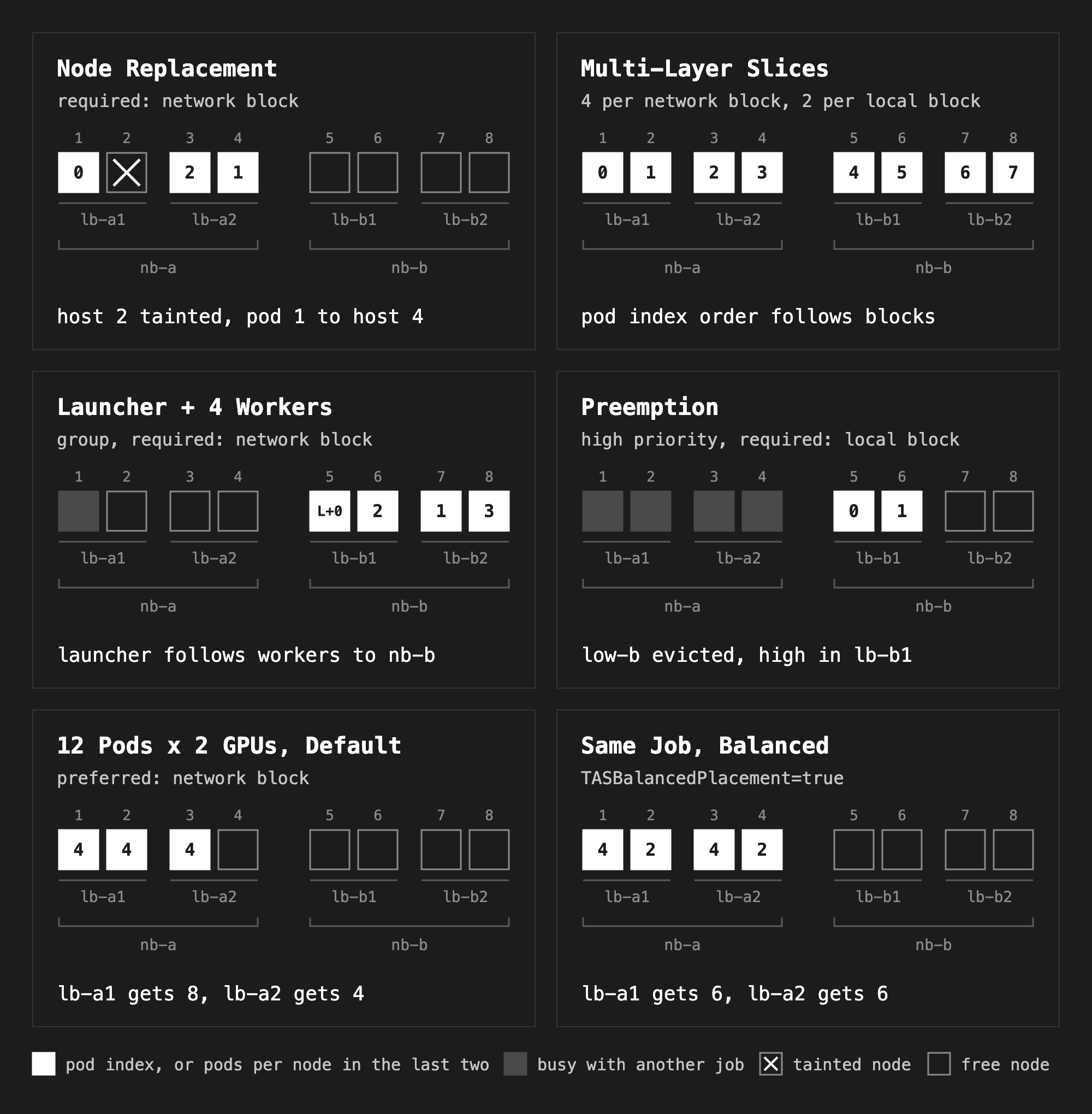
Pod 1 ran again 16 seconds after the taint, on 10.140.75.175, the free node of nb-a. The assignment in the Workload changed from 65.205, 68.178, 71.229 to 65.205, 71.229, 75.175. The Workload was never evicted, and the Job counted the old pod as failed:
kubectl get workload <name> -o json | jq -r '.status.conditions[] | "\(.type)=\(.status) reason=\(.reason) message=\(.message)"'

kubectl get job swap-3 -o jsonpath='active={.status.active} failed={.status.failed} succeeded={.status.succeeded}'
QuotaReserved=True reason=QuotaReserved message=Quota reserved in ClusterQueue gpu-rdma
Admitted=True reason=Admitted message=The workload is admitted
PodsReady=True reason=Recovered message=All pods reached readiness and the workload is running
active=3 failed=1 succeeded=
kubectl taint node "$NODE" maintenance=true:NoExecute-
A job that fills its whole domain cannot get a replacement inside it. If you use required placement for a large job, keep a spare node in the domain, or expect an eviction.
Multi-layer slices#
Slices can have up to three layers, from the widest to the narrowest, in one JSON annotation. Each inner size must divide the outer size. TASMultiLayerTopology is beta and on since v0.19 (kube_features.go, docs).
layers-8.yaml
apiVersion: batch/v1
kind: Job
metadata:
  name: layers-8
  labels:
    kueue.x-k8s.io/queue-name: gpu-rdma
spec:
  parallelism: 8
  completions: 8
  completionMode: Indexed
  template:
    metadata:
      annotations:
        kueue.x-k8s.io/podset-slice-required-topology-constraints: |
          [
            {"topology": "oci.oraclecloud.com/rdma.network_block_id", "size": 4},
            {"topology": "oci.oraclecloud.com/rdma.local_block_id", "size": 2}
          ]
    spec:
      restartPolicy: Never
      containers:
      - name: worker
        image: registry.k8s.io/pause:3.10.2
        resources:
          requests: { cpu: 100m, memory: 64Mi }
          limits: { nvidia.com/gpu: 8 }
POD NODE NETWORK_BLOCK LOCAL_BLOCK
layers-8-0-2qmmn 10.140.65.205 nb-a lb-a1
layers-8-1-mj8hq 10.140.68.178 nb-a lb-a1
layers-8-2-bjjx6 10.140.71.229 nb-a lb-a2
layers-8-3-fdskh 10.140.75.175 nb-a lb-a2
layers-8-4-gk6tp 10.140.77.31 nb-b lb-b1
layers-8-5-69lzp 10.140.84.34 nb-b lb-b1
layers-8-6-kj87r 10.140.88.205 nb-b lb-b2
layers-8-7-xm9sq 10.140.94.172 nb-b lb-b2
Pods 0 to 3 are in nb-a and pods 4 to 7 in nb-b, and every pair is in one local block. So pods 0 and 1 share a local block, and pods 0 to 3 share a network block. This fits a job with two levels of communication, a heavy one inside each pair and a lighter one inside each group of four. Which ranks run in which pod depends on the launcher.
PodSet groups#
In the JobSet experiment, the launcher went to a system node. A PodSet group does the opposite. It puts two PodSets of one Workload in the same domain, for example a launcher and its workers, or a leader and its workers. Both PodSets need the same podset-group-name and the same required or preferred topology. A group has exactly two PodSets, and one of them must have one pod (tas_validation.go).
jobset-group.yaml
apiVersion: jobset.x-k8s.io/v1alpha2
kind: JobSet
metadata:
  name: train-group
  labels:
    kueue.x-k8s.io/queue-name: gpu-rdma
spec:
  replicatedJobs:
  - name: launcher
    replicas: 1
    template:
      spec:
        template:
          metadata:
            annotations:
              kueue.x-k8s.io/podset-required-topology: oci.oraclecloud.com/rdma.network_block_id
              kueue.x-k8s.io/podset-group-name: train
          spec:
            restartPolicy: Never
            containers:
            - name: launcher
              image: registry.k8s.io/pause:3.10.2
              resources:
                requests: { cpu: 100m, memory: 64Mi }
  - name: workers
    replicas: 1
    template:
      spec:
        parallelism: 4
        completions: 4
        completionMode: Indexed
        template:
          metadata:
            annotations:
              kueue.x-k8s.io/podset-required-topology: oci.oraclecloud.com/rdma.network_block_id
              kueue.x-k8s.io/podset-group-name: train
          spec:
            restartPolicy: Never
            containers:
            - name: worker
              image: registry.k8s.io/pause:3.10.2
              resources:
                requests: { cpu: 100m, memory: 64Mi }
                limits: { nvidia.com/gpu: 8 }
To make the choice visible, I kept host 1 busy first. My first attempt used filler-a1 from the slices experiment, which is pinned to lb-a1. But in the mixed ClusterQueue, a GPU pod without a topology annotation no longer gets TAS. The system flavor has no GPUs, so the job waited:
kubectl apply -f filler-a1.yaml
QuotaReserved=False reason=ExceedsMaxQuota message=couldn't assign flavors to pod set main: Flavor "gpu-rdma" supports only TopologyAwareScheduling, insufficient quota for nvidia.com/gpu in flavor system, previously considered podsets requests (0) + current podset request (8) > maximum capacity (0)
So the busy job also asks for TAS, at the host level:
busy-host-1.yaml
apiVersion: batch/v1
kind: Job
metadata:
  name: busy-host-1
  labels:
    kueue.x-k8s.io/queue-name: gpu-rdma
spec:
  parallelism: 1
  completions: 1
  completionMode: Indexed
  template:
    metadata:
      annotations:
        kueue.x-k8s.io/podset-required-topology: kubernetes.io/hostname
    spec:
      restartPolicy: Never
      nodeSelector:
        oci.oraclecloud.com/rdma.local_block_id: lb-a1
      containers:
      - name: worker
        image: registry.k8s.io/pause:3.10.2
        resources:
          requests: { cpu: 100m, memory: 64Mi }
          limits: { nvidia.com/gpu: 8 }
kubectl delete -f filler-a1.yaml
kubectl apply -f busy-host-1.yaml
kubectl apply -f jobset-group.yaml
./placement.sh job-name=busy-host-1
./placement.sh jobset.sigs.k8s.io/jobset-name=train-group
POD                              NODE           NETWORK_BLOCK  LOCAL_BLOCK
busy-host-1-0-qncw4              10.140.65.205  nb-a           lb-a1
POD                              NODE           NETWORK_BLOCK  LOCAL_BLOCK
train-group-launcher-0-0-pqq4v   10.140.77.31   nb-b           lb-b1
train-group-workers-0-0-h7ndw    10.140.77.31   nb-b           lb-b1
train-group-workers-0-1-4tkg9    10.140.88.205  nb-b           lb-b2
train-group-workers-0-2-dd5l5    10.140.84.34   nb-b           lb-b1
train-group-workers-0-3-d75fm    10.140.94.172  nb-b           lb-b2
nb-a had three free nodes, so the whole group went to nb-b. The launcher shares the node of worker 0. Both PodSets got the TAS flavor:
kubectl get workload -o json | jq -c '.items[] | select(.metadata.ownerReferences[0].name=="train-group") | .status.admission.podSetAssignments[] | {name, count, flavors, levels: .topologyAssignment.levels}'
{"name":"launcher","count":1,"flavors":{"cpu":"gpu-rdma","memory":"gpu-rdma"},"levels":["kubernetes.io/hostname"]}
{"name":"workers","count":4,"flavors":{"cpu":"gpu-rdma","memory":"gpu-rdma","nvidia.com/gpu":"gpu-rdma"},"levels":["kubernetes.io/hostname"]}
Preemption#
TAS works with Kueue’s preemption. A high-priority job can evict lower-priority jobs. Kueue then computes the placement against the capacity that the eviction frees. Preemption is off by default (withinClusterQueue: Never, clusterqueue_types.go). It needs priorities and a ClusterQueue that allows it:
priorities.yaml
apiVersion: kueue.x-k8s.io/v1beta2
kind: WorkloadPriorityClass
metadata:
  name: low
value: 100
description: Jobs that can be preempted
---
apiVersion: kueue.x-k8s.io/v1beta2
kind: WorkloadPriorityClass
metadata:
  name: high
value: 1000
description: Jobs that can preempt low priority jobs
clusterqueue-preemption.yaml
apiVersion: kueue.x-k8s.io/v1beta2
kind: ClusterQueue
metadata:
  name: gpu-rdma
spec:
  namespaceSelector: {}
  preemption:
    withinClusterQueue: LowerPriority
  resourceGroups:
  - coveredResources: ["cpu", "memory", "nvidia.com/gpu"]
    flavors:
    - name: gpu-rdma
      resources:
      - { name: cpu, nominalQuota: 1000 }
      - { name: memory, nominalQuota: 8000Gi }
      - { name: nvidia.com/gpu, nominalQuota: 64 }
    - name: system
      resources:
      - { name: cpu, nominalQuota: 4 }
      - { name: memory, nominalQuota: 16Gi }
      - { name: nvidia.com/gpu, nominalQuota: 0 }
Two low-priority jobs fill the cluster, one network block each. They are local-4 with a priority label and a preferred network block:
low-a.yaml
apiVersion: batch/v1
kind: Job
metadata:
  name: low-a
  labels:
    kueue.x-k8s.io/queue-name: gpu-rdma
    kueue.x-k8s.io/priority-class: low
spec:
  parallelism: 4
  completions: 4
  completionMode: Indexed
  template:
    metadata:
      annotations:
        kueue.x-k8s.io/podset-preferred-topology: oci.oraclecloud.com/rdma.network_block_id
    spec:
      restartPolicy: Never
      containers:
      - name: worker
        image: registry.k8s.io/pause:3.10.2
        resources:
          requests: { cpu: 100m, memory: 64Mi }
          limits: { nvidia.com/gpu: 8 }
low-b.yaml is the same file with the name low-b:
sed 's/low-a/low-b/' low-a.yaml > low-b.yaml
Then a high-priority job that requires one local block:
high-2.yaml
apiVersion: batch/v1
kind: Job
metadata:
  name: high-2
  labels:
    kueue.x-k8s.io/queue-name: gpu-rdma
    kueue.x-k8s.io/priority-class: high
spec:
  parallelism: 2
  completions: 2
  completionMode: Indexed
  template:
    metadata:
      annotations:
        kueue.x-k8s.io/podset-required-topology: oci.oraclecloud.com/rdma.local_block_id
    spec:
      restartPolicy: Never
      containers:
      - name: worker
        image: registry.k8s.io/pause:3.10.2
        resources:
          requests: { cpu: 100m, memory: 64Mi }
          limits: { nvidia.com/gpu: 8 }
kubectl apply -f priorities.yaml -f clusterqueue-preemption.yaml
kubectl apply -f low-a.yaml
kubectl apply -f low-b.yaml
kubectl wait --for=jsonpath='{.status.ready}'=4 job/low-a job/low-b --timeout=3m
kubectl apply -f high-2.yaml
kubectl wait --for=jsonpath='{.status.ready}'=2 job/high-2 --timeout=3m
kubectl get workloads -o custom-columns='NAME:.metadata.name,PRIORITY:.spec.priority,ADMITTED:.status.conditions[?(@.type=="Admitted")].status'
NAME               PRIORITY   ADMITTED
job-high-2-acd0b   1000       True
job-low-a-3ff02    100        True
job-low-b-c41c4    100        False
./placement.sh job-name=high-2
POD                              NODE           NETWORK_BLOCK  LOCAL_BLOCK
high-2-0-g9wxb                   10.140.77.31   nb-b           lb-b1
high-2-1-vjv7p                   10.140.84.34   nb-b           lb-b1
The conditions of the Workload of low-b:
QuotaReserved=False reason=WaitingForQuota message=couldn't assign flavors to pod set main: Flavor "system" does not support TopologyAwareScheduling, insufficient unused quota for nvidia.com/gpu in flavor gpu-rdma, 16 more needed
Evicted=True reason=Preempted message=Preempted to accommodate a workload (UID: 91690fe1-ba5b-4d74-ac19-04979d8c8c9f, JobUID: 003d2bf1-bb7a-434e-9009-0e9e85ae001b) due to prioritization in the ClusterQueue; preemptor path: /gpu-rdma; preemptee path: /gpu-rdma
Preempted=True reason=InClusterQueue message=Preempted to accommodate a workload (UID: 91690fe1-ba5b-4d74-ac19-04979d8c8c9f, JobUID: 003d2bf1-bb7a-434e-9009-0e9e85ae001b) due to prioritization in the ClusterQueue; preemptor path: /gpu-rdma; preemptee path: /gpu-rdma
Requeued=True reason=Preempted message=Preempted to accommodate a workload (UID: 91690fe1-ba5b-4d74-ac19-04979d8c8c9f, JobUID: 003d2bf1-bb7a-434e-9009-0e9e85ae001b) due to prioritization in the ClusterQueue; preemptor path: /gpu-rdma; preemptee path: /gpu-rdma
Kueue evicts whole Workloads, not single pods. The high-priority job needed two nodes, but all four pods of low-b stopped, and low-b went back to the queue.
In this test, the quota of the ClusterQueue is exactly the 64 GPUs of the eight nodes. The two low jobs used all of it, so high-2 had no quota, and Kueue preempted to free quota. Then it placed high-2 in one local block of the freed nodes. low-b now waits for 16 more GPUs of quota, as its first condition says.
Balanced placement (alpha)#
The default best-fit algorithm fills one domain before it uses the next. That can leave a few pods alone in the last domain. In the Kueue docs, 12 pods in two domains with room for 10 each are placed (10,2). The docs say that (6,6) “would be more efficient” for all-to-all communication such as Allgather, because the traffic between the domains is spread better. The feature started with kubernetes-sigs/kueue#6554. There, a Kueue maintainer wrote that for a 16-pod job across two racks, “the split 8:8 into racks performs better than 1:15” in their experiments.
So balanced placement might give better performance for jobs with all-to-all collectives that do not fit in one domain. It is alpha and off by default (kube_features.go). It only works with podset-preferred-topology. Kueue balances the pods over the domains one level below the preferred level. If the job does not fit in one domain one level above the preferred level, Kueue falls back to the default algorithm. There is also an open bug where it ignores preferred node affinity (kubernetes-sigs/kueue#15334). It only shows when the TASNodeFeasibilityForAllLevels feature gate is off, which is not the default.
The test job has 12 pods with 2 GPUs each, so each node fits 4 pods and each local block 8. It prefers one network block, so Kueue balances it over the two local blocks of that network block:
balanced-12.yaml
apiVersion: batch/v1
kind: Job
metadata:
  name: balanced-12
  labels:
    kueue.x-k8s.io/queue-name: gpu-rdma
spec:
  parallelism: 12
  completions: 12
  completionMode: Indexed
  template:
    metadata:
      annotations:
        kueue.x-k8s.io/podset-preferred-topology: oci.oraclecloud.com/rdma.network_block_id
    spec:
      restartPolicy: Never
      containers:
      - name: worker
        image: registry.k8s.io/pause:3.10.2
        resources:
          requests: { cpu: 100m, memory: 64Mi }
          limits: { nvidia.com/gpu: 2 }
With the default algorithm:
kubectl apply -f balanced-12.yaml

./placement.sh job-name=balanced-12 | awk 'NR>1 {print $3, $4}' | sort | uniq -c
   8 nb-a lb-a1
   4 nb-a lb-a2
Then I deleted the job, turned on the feature gate with a Helm upgrade, and ran the same job again:
kueue-balanced-values.yaml
controllerManager:
  featureGates:
  - name: TASBalancedPlacement
    enabled: true
kubectl delete -f balanced-12.yaml
helm upgrade kueue oci://registry.k8s.io/kueue/charts/kueue --version 0.20.2 \
--namespace kueue-system -f kueue-balanced-values.yaml --wait
kubectl apply -f balanced-12.yaml
./placement.sh job-name=balanced-12 | awk 'NR>1 {print $3, $4}' | sort | uniq -c
   6 nb-a lb-a1
   6 nb-a lb-a2
The nodes now have 4, 2, 4 and 2 pods instead of 4, 4, 4 and 0. So the two local blocks have 6 pods each. I did not measure the performance difference.
What Kueue writes into the job and the pods#
I ran the commands in this section during the first experiment, while local-2 was running. After Kueue admitted the job, it changed the pod template of the Job:
kubectl get job local-2 -o json | jq '{suspend: .spec.suspend, gates: .spec.template.spec.schedulingGates, nodeSelector: .spec.template.spec.nodeSelector, tolerations: .spec.template.spec.tolerations, annotations: .spec.template.metadata.annotations}'
{
  "suspend": false,
  "gates": [
    {
      "name": "kueue.x-k8s.io/topology"
    }
  ],
  "nodeSelector": {
    "oke.oraclecloud.com/pool.name": "oke-rdma"
  },
  "tolerations": [
    {
      "effect": "NoSchedule",
      "key": "nvidia.com/gpu",
      "operator": "Exists"
    }
  ],
  "annotations": {
    "kueue.x-k8s.io/podset-preferred-topology": "oci.oraclecloud.com/rdma.local_block_id",
    "kueue.x-k8s.io/workload": "job-local-2-07949"
  }
}
The pod template now has the scheduling gate kueue.x-k8s.io/topology (topology_types.go), so the default scheduler cannot place the new pods yet. It also has the nodeLabels and the toleration of the flavor. Kueue’s topology ungater then removes the gate from each pod and adds a kubernetes.io/hostname node selector with the node from the assignment (topology_ungater.go):
kubectl get pods -l job-name=local-2 -o json | jq -r '.items[] | "\(.metadata.name) nodeSelector=\(.spec.nodeSelector|tojson) gates=\(.spec.schedulingGates // []|tojson)"'
local-2-0-l4x46 nodeSelector={"kubernetes.io/hostname":"10.140.65.205","oke.oraclecloud.com/pool.name":"oke-rdma"} gates=[]
local-2-1-kstl9 nodeSelector={"kubernetes.io/hostname":"10.140.68.178","oke.oraclecloud.com/pool.name":"oke-rdma"} gates=[]
The default scheduler still binds the pods, but each pod can only go to one node.
Without Kueue#
Node affinity and pod affinity with the same labels work pod by pod. The default scheduler places the first pod wherever it fits, and the other pods follow it. With soft rules, the job can still spread out. With hard rules, the job can start with some pods running and the rest waiting for room in a block that is already full. Kueue looks at all the pods of the job before any of them starts.
What I would do#
- Label the nodes from IMDS, and label them again after every scale-up or node replacement. Kueue leaves nodes without topology labels out. We have a labeler that does this.
- Use
podset-preferred-topologyon the local block for most jobs. It keeps the pods close when there is room and falls back when there is not. - Use
podset-required-topologyonly when the job is useless outside one domain. Such a job can wait forever, suspended with a condition and no pods. - When a job does not start, read the conditions of its Workload. Kueue says exactly what did not fit.
- Give every pod a request, and add a flavor without a topology for launchers. In a ClusterQueue with only TAS flavors, a pod without requests never starts, unless it is in a PodSet group (A pod with no requests).
- In a mixed ClusterQueue, give every GPU pod a TAS annotation. Without one, the pod goes to the flavor without a topology, and it never fits if that flavor has no GPUs (PodSet groups).
- Enable every job integration that you use. The default Helm values of v0.20.2 do not enable
kubeflow.org/pytorchjob(values.yaml). The running config on the test cluster listedbatch/job,jobset.x-k8s.io/jobset,trainer.kubeflow.org/trainjobandkubeflow.org/mpijob, but not PyTorchJob. - Use slices for groups of pods that talk to each other the most, and multi-layer slices when the job has two levels of communication.
- Keep a spare node in each domain if you can, so node replacement has somewhere to go. This matters for required placement. With preferred placement, the replacement can land in another domain.
- Make workers exit with a non-zero code on
SIGTERM. In my test, node replacement only worked when the evicted pod counted as failed (Node replacement). - Turn on preemption with WorkloadPriorityClasses, so urgent jobs do not wait behind long ones. Kueue evicts whole jobs, so a small high-priority job can stop a large low-priority job (Preemption).
- Try balanced placement for jobs with all-to-all collectives that span domains, and measure it, because it is still alpha.